
Transforming digital processes with AI: A Power Automate Process Mining Case Study at Microsoft Customer and Partner Solutions (MCAPS)
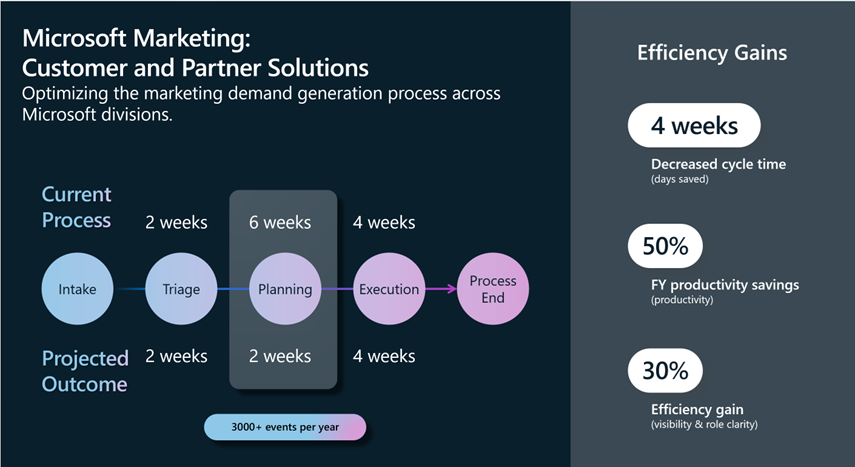
How can businesses streamline their processes and optimize their performance with process mining? Microsoft Customer and Partner Solutions organization has been using Power Automate Process Mining with Copilot to analyze, improve, and monitor their sales processes. The results have been impressive for their marketing demand generation process. Read on to learn how they did it, and how you can benefit from Power Automate Process Mining too.
The post Transforming digital processes with AI: A Power Automate Process Mining Case Study at Microsoft Customer and Partner Solutions (MCAPS) appeared first on Microsoft Power Platform Blog.
Published on:
Learn moreWe can help you with Transforming digital processes with AI: A Power Automate Process Mining Case Study at Microsoft Customer and Partner Solutions (MCAPS)
If you want help implementing, troubleshooting, or improving this product, contact us and we’ll point you in the right direction.
Related posts
What’s new in Power Platform: September 2026 feature update
Power Platform Build hands-on Power Platform and AI expertise with Power Series Developed by the Power CAT team, Power Series is now available...
Register now for PPCC 2026: Come for the learning, stay for the community
Whether you’re exploring AI in your business, building with low code, developing professional solutions, or leading enterprise-wide transforma...
Power Platform Monitor Alerts Are Now Generally Available
We are excited to announce that Power Platform Monitor alerts for apps, agents, and flows are now generally available! Monitor alerts meet the...
What’s new in Power Platform: March 2026 feature update
Welcome to the Power Platform monthly feature update! We will use this blog to share news in Power Platform from the last month, so you can fi...
2026 release wave 1 plans for Microsoft Dynamics 365, Microsoft Power Platform, and Copilot Studio offerings
We’re excited to publish the 2026 release wave 1 plans for Microsoft Dynamics 365, Microsoft Power Platform, and Role-based agents in Microsof...
New enhancements to work queues that will transform how your teams manage and monitor automated workflows.
A Unified Control Center for Queue Monitoring and SLA Tracking Work queues in Power Automate are structured lists that let you assign, track, ...
Breaking down the facts about secure development with Power Platform
Today, organizations are being measured by how quickly they can innovate. Whether it’s launching new digital experiences, streamlining o...
Take Charge and Stay Ahead with Power Platform Monitor Alerts
Stay ahead with Power Platform Monitor Alerts (public preview). Admins set custom health thresholds to proactively monitor their resources and...
Effortless Visibility and Operational Insights for All with Monitor
Monitor delivers visibility and actionable insights for makers and admins, no setup required. Track the health of canvas apps, model-driven ap...
2025 release wave 2 plans for Microsoft Dynamics 365, Microsoft Power Platform, and Role-based Microsoft Copilot offerings
The 2025 release wave 2 for Microsoft Dynamics 365, Microsoft Power Platform, and Copilot offerings introduces new capabilities that help orga...