
How To: APIM Asynch to Synch Pattern
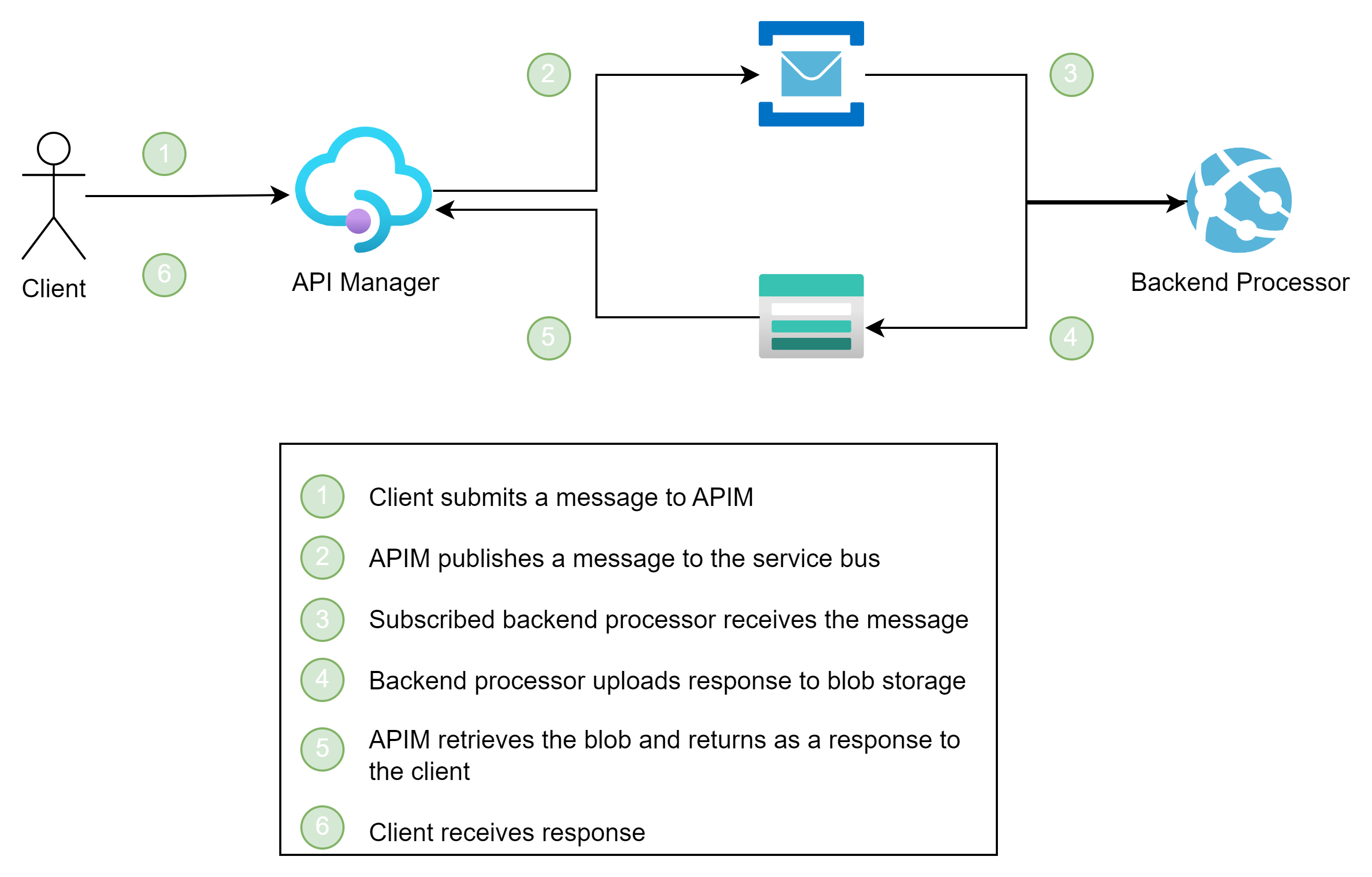
In this How To post, I will use APIM to turn an asynchronous messaging into a synchronous messaging by publishing a message to Azure Service Bus and retrieving the response using Azure Blob Storage.
The following illustrates the pattern:

Just because you can do something, does not mean you should...
Most developers I know would solve this by introducing a Function or Logic App to handle the async to sync messaging. I did find some good blog posts on using a Function App or Logic App, but I wanted to discover if this was possible and how well it worked.
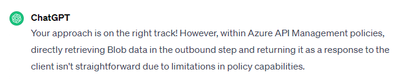
Even ChatGpt thought I was doomed for failure:
...

Again, this is working, but I would hesitate to push to production until you have confidence in the implemention.
Setup
For those of you who want to follow along, you will need to provision Azure API Management, Azure Storage, Azure Service Bus, and a local or Azure-based ASP.Net Core application.
Azure API Management
Creating a new instance of Azure APIM takes time to provision but is straight forward: https://learn.microsoft.com/en-us/azure/api-management/get-started-create-service-instance. I created a developer instance.
Once APIM is available, create a new HTTP API. In my example, I am only setting the base url for the Service Bus so my Frontend URL is structured to post to a queue called "request":

I will cover the policy after we cover the other services.
Azure Storage
I kept things simple and created a publicly accessible blob container named "reply". I do recommend using service identity whenever possible so would recommend this. Have a look at How To: Send Requests to Azure Storage From API Management for an example of how to achieve this.
Azure Service Bus
For my purposes, I created a standard Azure Service Bus and kept all the default settings. I then created a queue called "request".
ASP.Net Core
I ran a local ASP.Net Core 7 application for my testing. In the end, it became a more sophistiated echo where it uploaded to Azure Blob Storage the content it received from the published message. I did learn some things though around how to handle dependency injection with the Azure.Messaging.ServiceBus package.
ServiceListener
I first created a class that would listen to messages published to the Service Bus named ServiceListener:
The ServiceListener will receive ServiceBusProcessor and a BlobServiceClient in the constructor. The ServiceBusProcessor will be used to listen to messages posted to the request queue. This is down by registering to the ProcessMessageAsync event. The BlobServiceClient will be used to upload to the Azure Blog Storage.
The ServiceListener implements the BackgroundService as I want it to run for the life of application. This requires the ExecuteAsync() method to be implemented:
The ServiceListener also implements the IDisposable interface. This is so we politely stop the service when the application stops.
MessageHandler() is used to upload the message content to blob storage. I simply used a naming convention based on the MessageId:
It is also required to define a ProcessErrorAsync callback.
To set the ServiceListener so that it starts up correctly, I added the following to the Startup method:
To use the extensions, you do need to bring in the Microsoft.Extensions.Azure package.
Azure APIM Policy
With the setup done, let's discuss the policy. I broke this up into two steps: inbound and outbound.
inbound
The inbound step will be used to submit the message to the service bus. I did use ServerlessNotes as a basis so give them a visit for some tips.
There is a lot to unpack here. For the token side, please see the ServerlessNotes site. I did find the behavior less than perfect where I had to submit multiple times for the cache to start working correctly.
What I do want to highlight is the RequestId of the APIM request becomes the MessageId of the Service Bus message. This value will be unique and will allow us to match up the reply with the request.
outbound
In the outbound step, we will retrieve the response from blob storage.
The outbound is fairly straightforward. We are using the RequestId to retrieve the reply from storage. This example uses a public location to keep things simple. I did set the timeout to 120 seconds but in my cases the handling of the message was subsecond so this was not required.
Conclusion
I performed my testing in the Azure Portal and Postman. In my case, I was just replying with the posted message so my response time was consistently under 200ms. Most responses were close to under 50ms. Note this was between Australia and New Zealand so I anticipate the performance to be better within the same region.
In short, this was interesting as I had not seen this done. I am sure others have, so if you have, please put a comment with your thoughts on the approach.
Cheers!
Published on:
Learn moreWe can help you with How To: APIM Asynch to Synch Pattern
If you want help implementing, troubleshooting, or improving this product, contact us and we’ll point you in the right direction.
Related posts
This Month in Azure Static Web Apps | 09/2024
We are back with another edition of the Azure Static Web Apps Community! :party_popper: September was yet another month ...
GitHub Copilot for Azure: 6 Must-Try Features
As developers, we are constantly seeking tools that streamline our workflows and boost productivity. … Enter GitHub Copilot for Azure, now in ...
Responsible AI Mitigation Layers
Generative AI is increasingly being used in various kinds of systems to augment humans and infuse intelligent behavior into existing and new a...
Streamline Your Azure Workflow: Introducing GitHub Copilot for Azure in VS Code
I'm excited to announce the public preview of GitHub Copilot for Azure - a new addition to your toolkit that seamlessly integrates with G...
Build Intelligent Apps Code-First with Prompty and Azure AI
Building Generative AI applications can feel daunting for traditional app developers. What does the end-to-end applicati...
Certificación AI-900 (Fundamentos de IA) con Chicas en IA
La inteligencia artificial ha llegado para quedarse, ¡y más aún con la revolucionaria IA generativa! Para ayudar a los profesionales a especia...
Get certified with Learn Live GitHub series!
GitHub Universe is coming, and Microsoft and GitHub are partnering to offer a new special Learn Live series in Brazilian Portuguese, English a...
Certifícate con Learn Live GitHub en Español
Microsoft y GitHub se han unido para ofrecer una nueva serie especial de Learn Live en inglés y español: GitHub 2024. Del 10 al 24 de Octubre,...
Evaluating generative AI: Best practices for developers
As a developer working with generative AI, you've likely marveled at the impressive outputs your models can produce. But how do you ensure the...
Introducing Azure Product Retirement Livestreams
The Azure Retirements team, in collaboration with key partner groups, is excited t...