
Join Azure Communication Services at Microsoft 365 Conference in Las Vegas, Nevada

We are excited to represent Azure Communication Services and lead a session at the Microsoft 365 Conference on Wednesday, May 3rd in Las Vegas, Nevada. We invite you to join us for our in-person session to discuss Azure Communication Services interoperability with Microsoft Teams at 1:30 p.m. PST. Get registered here.

Azure Communication Services is a cloud-based communication platform that provides developers with tools to enable chat, voice, video, email, and SMS within their applications. With Azure Communication Services, developers can easily create and customize communication experiences for their users.
Azure Communication Services interoperability with Microsoft Teams can be used to build custom applications that allow business to reach customers through multiple channels, whether they’re using Teams or not. We are looking forward to sharing more on these use cases at the Microsoft 365 Conference. Here’s a sneak peek into the content:
Virtual Appointments
In today’s fast-paced world, customers expect to be served wherever they are. This creates a compelling case for businesses to offer virtual appointments, allowing customers to connect with professionals from the comfort of their homes, during a commute, or anywhere in between. Virtual Appointments in Microsoft Teams provides out-of-the-box capabilities. For businesses looking for more customization, we offer solutions with Azure Communication Services and Microsoft Graph. Businesses can create custom solutions tailored to their branding and integrated into their applications and processes.
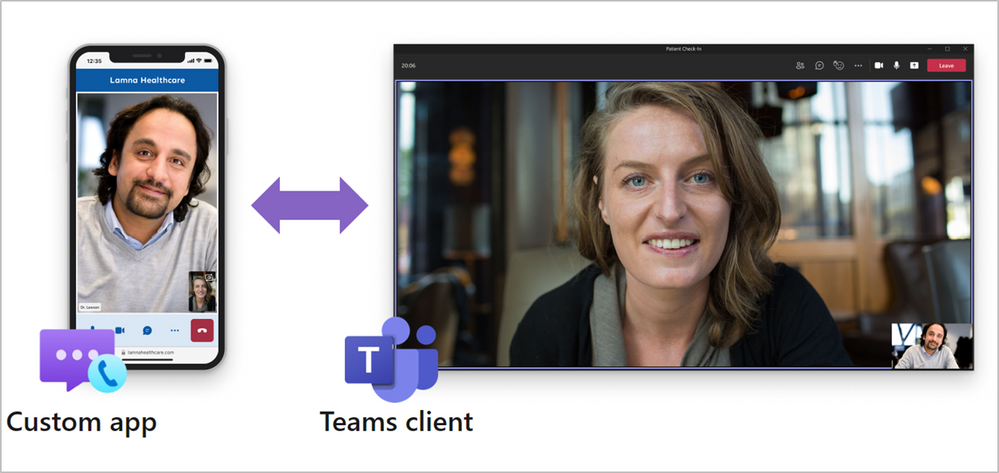
Audio/Video Calling from a Custom App into a Teams Meeting
Azure Communication Services can enable interactions with Microsoft Teams users over voice, video, chat, and screen sharing from your custom application or website. Additionally, we have our Azure Communication Services UI Library for ready-to-use customizable, production-ready components that can be easily added to your applications. Learn more about Teams interoperability here. Check out our tutorial on creating a React app that enables a user to call into a Microsoft Teams meeting using audio and video.
Automate workflows with Power Apps connectors for Azure Communication Services and Microsoft Teams
Low-code connectors have revolutionized the way developers and business users automate scenarios, allowing them to quickly create solutions using the power of connectors. Azure Communication Services offers a range of email, chat, SMS, and identity connectors that can be used along with Teams connectors, providing businesses with the ability to create custom workflows that meet their unique needs.
For example, developers can trigger an email when an asset is approved in Teams, send an SMS reminder for an upcoming appointment, and more. These are just a few examples of how businesses can use Azure Communication Services to automate their workflows and improve their communication processes.
Identity Connector
See you at the Microsoft 365 Conference!
Azure Communication Services interoperability with Microsoft Teams is valuable for developers who want to build customizable communication experiences into their workflows. At the Microsoft 365 Conference, Azure Communication Services will be presenting some exciting use cases that demonstrate the power of this integration. Whether you're building virtual appointment experiences or automating communication workflows, Azure Communication Services and Microsoft Teams provide developers with tools to create powerful communication-enabled applications. Can’t wait to see you there.
Published on:
Learn moreWe can help you with Join Azure Communication Services at Microsoft 365 Conference in Las Vegas, Nevada
If you want help implementing, troubleshooting, or improving this product, contact us and we’ll point you in the right direction.
Related posts
Azure Communication Services Ideas Board: Share your feedback with the product team
Innovation is not a solitary pursuit, and we recognize that some of the best ideas come from you, our Azure Communication Services community. ...
Engage with the Azure Community Services Ideas Board: Your Voice Matters
Innovation is not a solitary pursuit, and we recognize that some of the best ideas come from you, our Azure Communication Services community. ...
Part 2 - Multichannel notification system using Azure Communication Services and Azure Functions
In the first part of this topic, we setup all the Azure resources like the Azure Communication Services for Email, SMS, WhatsApp for...
Part 1 - Multichannel Notification System with Azure Communication Services and Azure Functions
In the interconnected digital era, it's crucial for businesses and services to communicate effectively with their audience. A robust notificat...
Building a WhatsApp AI bot for customer support
Building a WhatsApp AI Bot for customer support In this blog post, we’ll explore how to build a customer support application that integ...
Azure Communication Services September 2024 Feature Updates
The Azure Communication Services team is excited to share several new product and feature updates released in August 2024. (You can view previ...
Azure Communication Services at the DEVIntersection Conference
Join us for the DEVintersection Conference from September 10 to 12, 2024, in Las Vegas, Nevada. This event gathers technology enthusiasts from...
Azure Communication Services June 2024 Feature Updates
Data Retention with Chat threads Developers can now create chat threads with a retention policy between 30 and 90 days. This feat...
Azure Communication Services August 2024 Feature Updates
The Azure Communication Services team is excited to share several new product and feature updates released in July 2024. (You can view previou...
Anywhere365 integrates Azure Communication Services into their Dialogue Cloud Platform
Every day, companies aim to help their customers realize the most value from their products and services. They do this by providing ef...