
Introducing the Network Security Dashboard for Microsoft Defender for Cloud

Written in collaboration with
Introduction
Microsoft Azure enables you to deploy a variety of infrastructure, web application and automation resources. These resources are generally a part of a larger infrastructure or an application service that your organization provides to its internal and external users. In addition to the networking endpoints of an overarching service that your users interact with, the different resources in an infrastructure or application service interact with each other through their own networking endpoints. These interactions depend on the underlying networking services provided by the Azure cloud to communicate with other tiers and with its users. This communication internally within Azure and to Azure from external networks is protected with resource specific ACLs and with the cloud native network security services such as DDoS Protection, Web Application Firewall (WAF), Network Security Groups (NSG) and Firewall in Azure. With all network security controls in place, and each one implemented in a different dashboard, it becomes challenging for customers to have a single view of their entire Azure Network Security state, and that is what this workbook aims to solve.
Current Challenge
As your footprint in the Azure Cloud grows, the number of services and the infrastructure, application and automation resources involved in these services increases significantly which results in the number of endpoints which are exposed internally and externally, with or without the required security controls. This represents the attack surface of your organization which can be exploited by an attacker. To appropriately secure your attack surface, you require better monitoring and governance of your resources, services, and their endpoints. The first step in this process is to inventory and gain visibility into the networking and security configuration your endpoints across your environment, along with the network security services they utilize or those which maybe inline. This helps you understand all the different paths an attacker can utilize to compromise your boundary and infiltrate into your environment plus the protections you already have against or those that need to put in place to prevent them.
Proposed Solution
Up until now, there was no single view with which you could visualize all your externally or internally exposed endpoints, their networking and security configuration or the network security services you had setup in Azure. You had to browse through many different blades in Azure to assess and obtain this information. With the availability of the new Network Security Dashboard for Microsoft Defender for Cloud, you can now quickly get real time visibility of the security configuration of your networking and network security services, across multiple subscriptions in Azure.
The Network Security Dashboard is free to use for all customers and does not require you to be a paid customer of Azure Security Center.
What’s in the Dashboard
The new Network Security Dashboard for Microsoft Defender for Cloud (formerly Azure Security Center) provides a unified view and deep visibility into the configuration of your overall networking, and network security services in Azure. If you have been actively using Microsoft Defender for Cloud and Network Security features in Azure, this dashboard is for you!
The dashboard is powered by Azure Resource Graph (ARG) queries and divided into different sections as explained below:
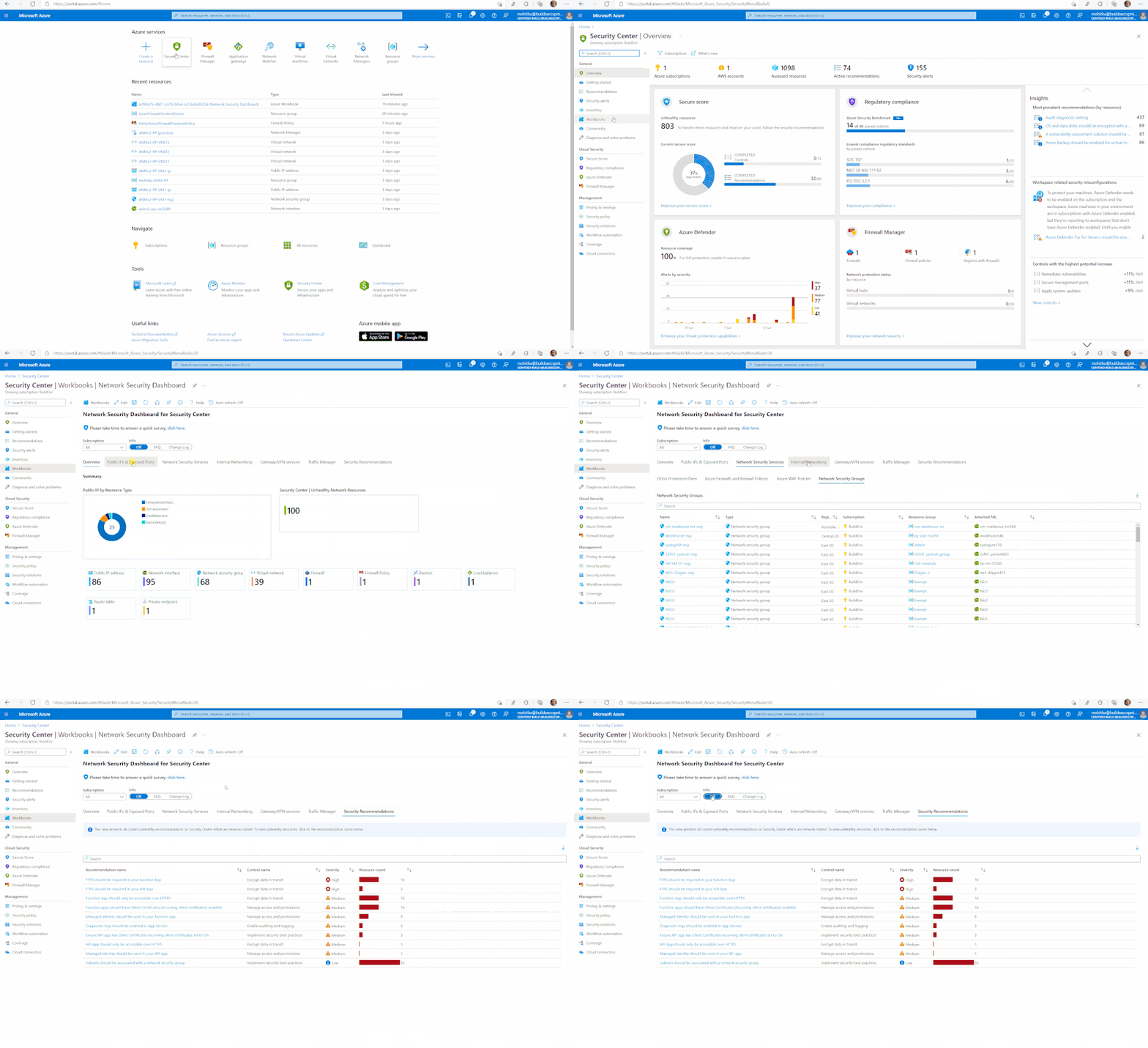
- Overview: summary view of all your network security and networking resources for selected subscription(s)
- Public IPs & exposed ports: ports exposed to the internet and mapping of public IPs to asset types
- Network security services: DDoS protections plans, Azure Firewall and Firewall policies, Azure WAF policies and NSG views
- Internal networking mapping: network interfaces, route tables, private links, and virtual networks with DDoS protection status (including subnets and peering)
- Gateway and VPN services: consolidated view of Bastion hosts, VPN gateways, Virtual Network Gateways and Express Route circuits
- Traffic Manager: details of all your traffic manager profiles
- Microsoft Defender for Cloud recommendations: filtered view of all ASC network related recommendations including resource count, severity, and security control
Informational options can be accessed using the action bars at the top section, select FAQ button to show the frequently asked questions. You can also see recent changes documented on the change log option.
How to Deploy
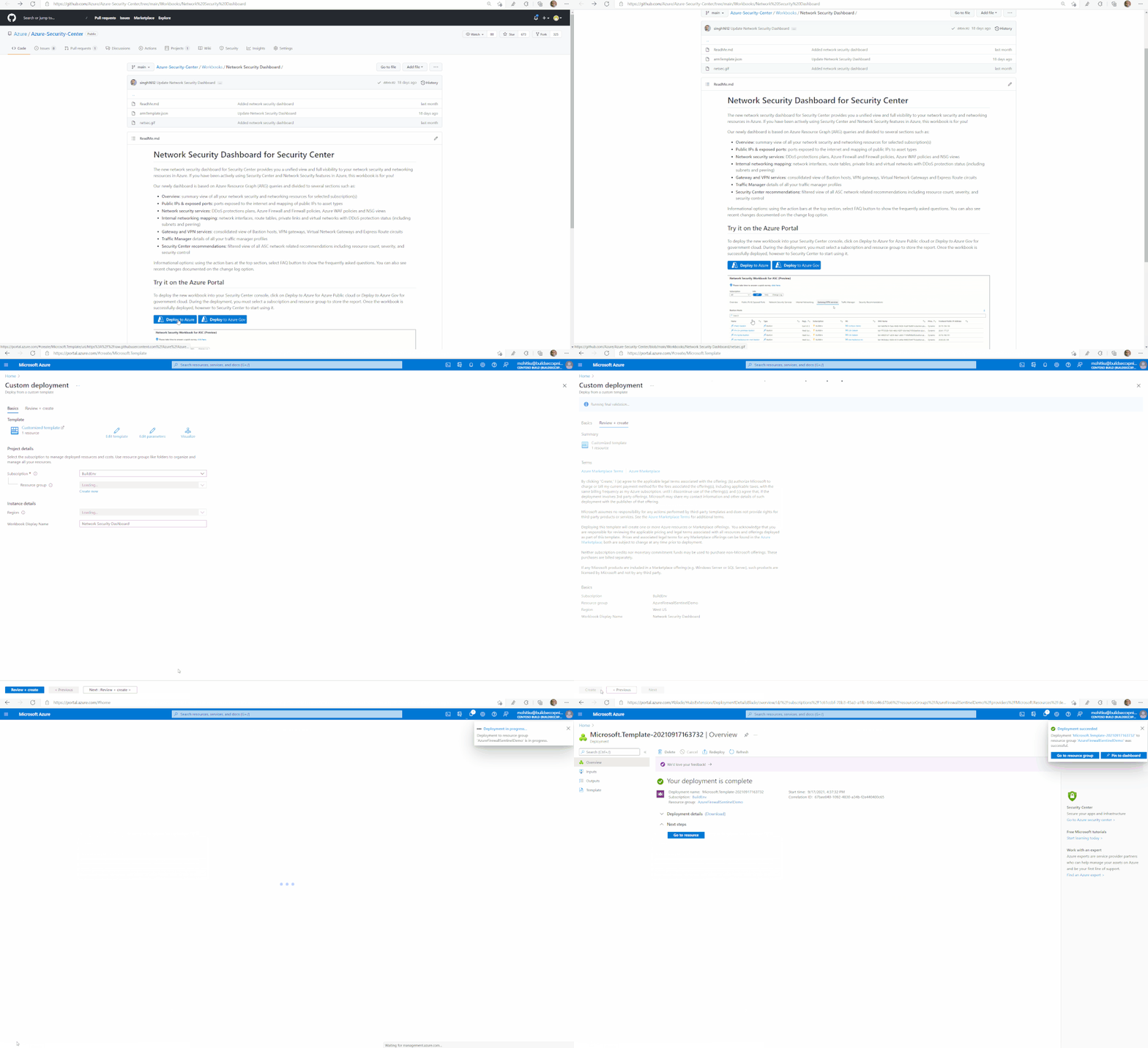
The Network Security Dashboard is available in the Microsoft Defender for Cloud GitHub Repo page, under Workbooks and can be accessed directly with its direct URL: https://aka.ms/DeployNetSecWorkbook
The workbook can be deployed quickly in the Azure Commercial and Gov cloud environments by clicking the respective “Deploy to Azure” buttons on the workbook page.
How Does it Work
The Network Security Dashboard is a workbook in Microsoft Defender for Cloud. The workbook is based on Azure Resource Graph (ARG) queries which retrieve real time configuration data of your resources, networking and network security services deployed across multiple subscriptions in Azure. The workbook can be edited, and all queries can be modified to meet your needs.
How to Use
To use this dashboard, you need at least Reader permission at the subscription level. Assuming you have the required permissions, watch the screen capture below to learn about how to navigate through and use the dashboard.
Conclusion
The Network Security dashboard provides valuable information about your attack surface in Azure. The workbook is available to all customers free of charge and does not require you to be a paid customer of Microsoft Defender for Cloud
We will continue to add support for additional Azure Network Security and networking products to the workbook in future. You will find information about all future revisions and currently planned future updates in the Upcoming Changes section on the GitHub page for the workbook. You can also contribute to the workbook by joining the community and following the guidance.
Additional Resources
- To learn more about Microsoft Defender for Cloud, visit: https://aka.ms/ascninja
- To learn more about Azure Network Security, visit: https://aka.ms/AzNetSecNinja
- To deploy or learn more about the Network Security Dashboard, visit: https://aka.ms/DeployNetSecWorkbook
- To learn about Microsoft Defender for Cloud workbooks, visit: https://docs.microsoft.com/en-us/azure/security-center/custom-dashboards-azure-workbooks
- To learn about ARG, visit: https://docs.microsoft.com/en-us/azure/governance/resource-graph/
Reviewers:
Published on:
Learn moreWe can help you with Introducing the Network Security Dashboard for Microsoft Defender for Cloud
If you want help implementing, troubleshooting, or improving this product, contact us and we’ll point you in the right direction.
Related posts
IPv6 Adoption: Enhancing Azure WAF on Front Door
The transition to IPv6 is a significant step for enterprise corporations, reflecting the evolution of internet technology and the need for a l...
Azure WAF’s Bot Manager 1.1 and JavaScript Challenge (Preview): Navigating the Bot Threat Terrain
Introduction Bots are a common presence on the internet, serving a range of functions from automating customer service to indexing page...
Private IP DNAT Support (Preview) and Scenarios with Azure Firewall
Introduction Azure Firewall is a cloud native security service to protect your workloads running in Azure. It is a stateful firewall as a serv...
Getting Started with Azure DDoS Protection REST API: A Step-by-Step Guide
REST API is a cornerstone in the management of resources on Azure, providing a streamlined and efficient approach for executing create, read, ...
Monitoring Azure DDoS Protection Mitigation Triggers
Monitoring Azure DDoS Protection Mitigation Triggers In today’s digital landscape, Distributed Denial of Service (DDoS) attacks pose a signifi...
Azure WAF’s Bot Manager 1.1 and JavaScript Challenge: Navigating the Bot Threat Terrain
Introduction Bots are a common presence on the internet, serving a range of functions from automating customer service to indexing page...
Utilizing Azure DDoS Protection Workbook for DDoS attack traffic Analysis
In today's digital age, the security of applications, servers, and networks is paramount. One of the most significant threats to this security...
Independent Configuration of Size Enforcement and Inspection Limits in Application Gateway WAF
Introduction In the constantly changing world of cybersecurity, both flexibility and effective security are essential for safeguarding ...
Private IP DNAT Support and Scenarios with Azure Firewall
Introduction Azure Firewall is a cloud native security service to protect your workloads running in Azure. It is a stateful firewall as a serv...
Monitoring traffic flows in Azure Firewall using Virtual Network Flow Logs
Azure Firewall is a managed service designed to protect your Azure Virtual Network resources, providing advanced threat protection and advance...