
Cross-Tenant Synchronization for seamless application access is now generally available!

Hello Everyone,
Today I'm thrilled to announce that Cross-tenant synchronization is generally available!
In the past, many of you spent significant time and money building custom scripts to provision accounts across tenants and enable cross-tenant collaboration. Since we launched public preview of cross-tenant sync in January, many of you quickly switched to the out of the box functionality and saved your companies both time and money. It’s amazing to hear how easy it has been to deploy cross-tenant synchronization! The rich feedback has provided new use cases we’re excited to share:
- Providing application access to users from other tenants in your organization
- Creating a unified global address list across tenants in an organization
- Enabling collaboration with users from another tenant in your organization
Customers, such as Siemens AG, are already sharing their positive experience:
"Cross-tenant synchronization and Cross-tenant access are two critical components in our Zero Trust approach here at Siemens. We currently bring in over 85000 employees from affiliate Siemens tenants and enable them to log on to central applications in our tenant while also processing Zero Trust signals. We synchronize employees from these tenants, make them visible in the address book, and provision both standard Azure AD and Siemens custom attributes. This approach not only leads to increased usability and convenience for our partners and application owners, but we also enjoy additional security benefits, for example from the HR lifecycle processes of our Siemens partners."
-Bastian Schüler and Philipp Bergmann, Identity Architects, Siemens AG
One of the key scenarios we’ve heard from customers is around application access so let’s walk through an example scenario where a multi-tenant organization, Contoso, provided birthright access to a manufacturing application:
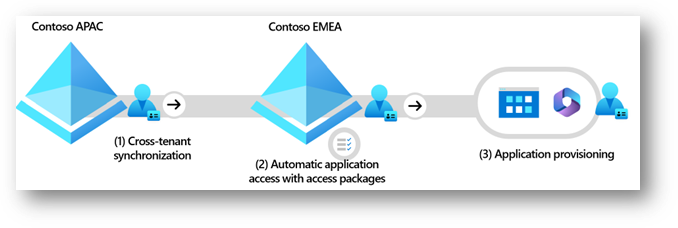
Enable Cross-tenant application access in three easy steps
In this scenario, a multi-tenant organization, Contoso, provides users across the organization access to a manufacturing application:
Step 1 – Turn on Cross-tenant synchronization.
Last year, the admin at Contoso EMEA enabled a Cross-tenant access setting to trust MFA from Contoso APAC. Now when they return to the Cross-tenant access settings experience in Azure Active Directory (Azure AD), there’s a new checkbox to enable Cross-tenant synchronization and auto-redemption. With a click of a checkbox, they’re done setting up Cross-tenant sync!
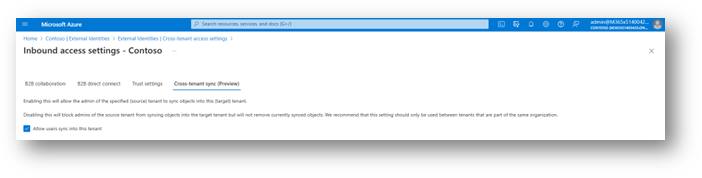
The admin at Contoso APAC then configures Cross-tenant synchronization and specifies:
- Which users to synchronize (based on group membership).
- What attributes to synchronize (the department attribute will be key to providing application access in this scenario).
- Any desired transformations, such as adding the domain to the end of the display name.
Once the admin at Contoso APAC starts Cross-tenant synchronization, Contoso APAC users are automatically provisioned into the Contoso EMEA tenant. A few Contoso APAC users were manually invited prior to enabling sync, and they’re kept up-to-date according to the rules specified above. The users from Contoso APAC can now be assigned access to applications in the Contoso EMEA tenant.
Step 2 – Automate application assignment.
The admins at Contoso EMEA have done a great job streamlining application access. When users are provisioned into Contoso EMEA, members of the manufacturing department are automatically assigned access to the manufacturing application through a dynamic access package. The access package grants users in the manufacturing department access to the manufacturing app and other resources, such as roles and SharePoint sites needed to get their work done.
Step 3 – Provision accounts in the manufacturing application.
The manufacturing app is on-premises and requires that users are provisioned before signing in. It doesn’t support modern APIs for user management, but it does have an OpenLDAP directory as a user store. The admins at Contoso EMEA have set up on-premises application provisioning to automate access to the on-premises app. Any user that’s assigned to the manufacturing app through an access package is automatically provisioned into the manufacturing app.
In this example, we can see how Contoso uses the capabilities in Microsoft Entra Identity Governance together to provide access to applications across tenants in an organization. They’re able to automate the process end-to-end and automate providing application access across tenants. In the past, customers have spent months building custom scripts to synchronize accounts across tenants. With the release of cross-tenant sync, customers see value in a matter of minutes, and save on the cost of maintaining those custom scripts. We’re excited to see how you will use these capabilities.
Go enable Cross-Tenant synchronization today! We love hearing from you, so share your feedback on these new features through the Azure forum or by tagging @AzureAD on Twitter.
Joseph Dadzie, Partner Director of Product Management
Linkedin: @joedadzie
Twitter: @joe_dadzie
Learn more about Microsoft identity:
- Related Articles: Cross-tenant synchronization
- Video overview: aka.ms/crosstenantsynchronizationvideo
- Return to the Azure Active Directory Identity blog home
- Join the conversation on Twitter and LinkedIn
- Share product suggestions on the Azure Feedback Forum
Published on:
Learn moreRelated posts
Sync identities from Rippling to Microsoft Entra ID
Today, we’re thrilled to announce that customers using Rippling HCM can now automatically provision users to on-premises Active Directory and ...
Microsoft Entra ID Governance for government
I’m pleased to announce that as of November 1, 2024, Microsoft Entra ID Governance is available for federal agencies, state and local governme...
Update to security defaults
As part of the Secure Future Initiative, we’ve evolved our security approach to align with three security principles: secure by design, secure...
Meet Microsoft Entra at Ignite 2024: November 18-22
Microsoft Ignite is just around the corner, taking place from Monday, November 18, 2024 through Friday, November 22, 2024, in Chicago, Illinoi...
Manage Microsoft Entra ID role assignments with Microsoft Entra ID Governance
I’m excited to announce that we now support Microsoft Entra role assignments in Microsoft Entra ID Governance's Entitlement Management feature...
The latest enhancements in Microsoft Authenticator
Hi folks, I'm thrilled to announce three major Microsoft Entra ID advancements that will help you protect your users with phishing-resi...
Microsoft Security announcements and demos at Authenticate 2024
The Microsoft Security team is excited to connect with you next week at Authenticate 2024 Conference, taking place October 14 to 16 in Carlsba...
What's new in Microsoft Entra - September 2024
We’re excited to announce the general availability of Microsoft Entra Suite—one of the industry’s most comprehensive secure access solutions f...
Explore the key benefits of Microsoft Entra Private Access
The traditional network security models are becoming increasingly ineffective in a world where remote work and cloud services are the norm. Co...
Join us at the Microsoft Entra Suite Showcase!
This fall, we are bringing the Microsoft Entra Suite Showcase to cities worldwide. Join us to explore how our latest advancements in secure id...