
Azure Communication Services April 2024 Feature Updates

The Azure Communication Services team is excited to share several new product and feature updates released in March 2024. (You can view previous blog articles here.)
See this month’s updates below:
- Calling to Microsoft Teams Call Queues and Auto Attendants
- Email Updates: SMTP, Opt-out options, and more
Calling to Microsoft Teams Call Queues and Auto Attendants
Azure Communication Services Calling to Teams call queues and auto attendants and click-to-call for Teams Phone are now generally available. Organizations can enable customers to easily reach their sales and support members on Microsoft Teams with just a single click. By adding a click-to-call widget onto a website, such as a “Sales” button that points to a sales department, or a “Purchase” button that points to procurement, customers are just one click away from a direct connection into a Teams call queue or auto attendant.
You can learn more about joining your calling app to a Teams call queue or auto attendant, and about building contact center applications in our documentation.
Email Updates
There were several updates to Azure Communication Services Email service in March.
- SMTP
- Opt-out management
- PowerShell cmdlets
- CLI extension
SMTP
Azure Communication Services Email’s SMTP as a Service is now generally available. developers can use the SMTP support in Azure Communication Services to send emails easily, improve security features, and have more control over outgoing communications. The SMTP Relay Service acts as a link between email clients and mail servers and helps deliver emails more effectively. It sets up a specialized relay infrastructure that not only handles higher throughput needs and successful email delivery, but also improves authentication to protect communication. Moreover, this service offers businesses a centralized platform that lets them manage outgoing emails for all B2C communications and get insights into email traffic.
With this capability, customers can switch from on-premises SMTP solutions or link their line of business applications to a cloud-based solution platform with Azure Communication Services Email. This specifically enables:
- Secure and reliable SMTP endpoint with TLS 1.2 encryptions
- Access with Microsoft Entra Application Id to secure authentication for sending emails using SMTP.
- High volume sending support for B2C communications using SMTP and REST APIs.
- The security and compliance to honor and respect data handling and privacy requirements that Azure promises to our customers.
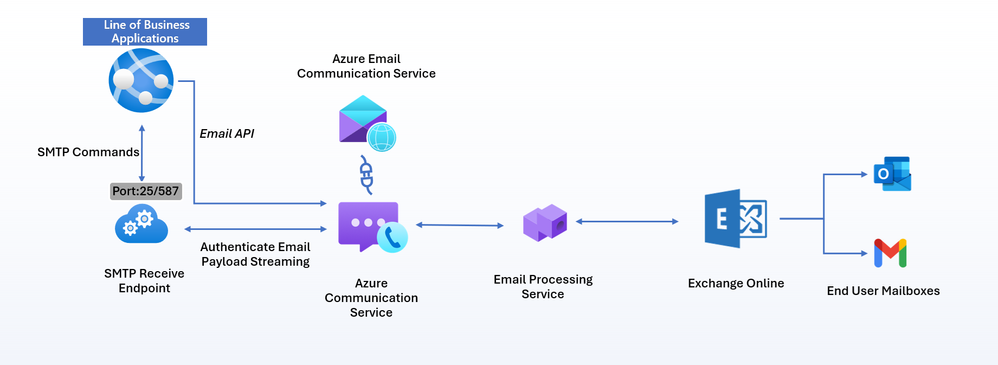
You can learn more about SMTP as a Service in our documentation.
Opt-out Management
Azure Communication Service Email opt-out management, now in public preview, offers a powerful platform with a centralized managed unsubscribe list with opt-out preferences saved to our data store. This feature helps developers meet guidelines of email providers who often require one-click list-unsubscribe implementation in the emails sent from their platforms. To proactively identify and avoid significant delivery problems, suppression list features help improve reputation and helps customers to easily manage opt-outs and maintain compliance.
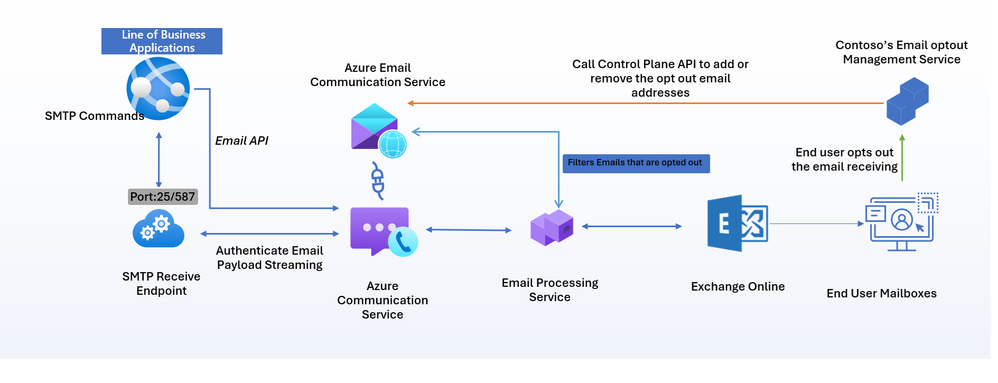
Get started with Managing emails opt out today.
PowerShell Cmdlets & CLI extension
PowerShell Cmdlets
To enhance the developer experience, Azure Communication Services is introducing more PowerShell cmdlets and Azure CLI extensions for working with Azure Communication Service Email.
With the addition of these new cmdlets developers can now use Azure PowerShell cmdlets for all CRUD operations for Email Service including:
- Create Communication Service Resource (existing)
- Create Email Service Resource (new)
- Create Domain (Azure Managed or Custom Domain) Resource (new)
- Initiate/Cancel Custom Domain verification (new)
- Add a sender username to a domain (new)
- Link a Domain Resource to a Communication Service Resource (exiting)
You can learn more in the PowerShell cmdlets documentation.
Azure CLI extension for Email Service Resources management
With the addition of these new extensions developers can now use Azure CLI for their end to end send email flow including:
- Create Communication Service Resource (existing)
- Create Email Service Resource (new)
- Create Domain (Azure Managed or Custom Domain) Resource (new)
- Add a sender username to a domain (new)
- Link a Domain Resource to a Communication Service Resource (exiting)
- Send an Email (existing)
You can learn more about this in our Extensions documentation.
You can learn more about these updates and Azure Communications Services Communication Platform as a Service in our overview.
Published on:
Learn moreWe can help you with Azure Communication Services April 2024 Feature Updates
If you want help implementing, troubleshooting, or improving this product, contact us and we’ll point you in the right direction.
Related posts
Azure Communication Services Ideas Board: Share your feedback with the product team
Innovation is not a solitary pursuit, and we recognize that some of the best ideas come from you, our Azure Communication Services community. ...
Engage with the Azure Community Services Ideas Board: Your Voice Matters
Innovation is not a solitary pursuit, and we recognize that some of the best ideas come from you, our Azure Communication Services community. ...
Part 2 - Multichannel notification system using Azure Communication Services and Azure Functions
In the first part of this topic, we setup all the Azure resources like the Azure Communication Services for Email, SMS, WhatsApp for...
Part 1 - Multichannel Notification System with Azure Communication Services and Azure Functions
In the interconnected digital era, it's crucial for businesses and services to communicate effectively with their audience. A robust notificat...
Building a WhatsApp AI bot for customer support
Building a WhatsApp AI Bot for customer support In this blog post, we’ll explore how to build a customer support application that integ...
Azure Communication Services September 2024 Feature Updates
The Azure Communication Services team is excited to share several new product and feature updates released in August 2024. (You can view previ...
Azure Communication Services at the DEVIntersection Conference
Join us for the DEVintersection Conference from September 10 to 12, 2024, in Las Vegas, Nevada. This event gathers technology enthusiasts from...
Azure Communication Services June 2024 Feature Updates
Data Retention with Chat threads Developers can now create chat threads with a retention policy between 30 and 90 days. This feat...
Azure Communication Services August 2024 Feature Updates
The Azure Communication Services team is excited to share several new product and feature updates released in July 2024. (You can view previou...
Anywhere365 integrates Azure Communication Services into their Dialogue Cloud Platform
Every day, companies aim to help their customers realize the most value from their products and services. They do this by providing ef...