
Enterprise IoT security with Defender for IoT now included in Microsoft 365 E5 and E5 Security plans
In this evolving digital landscape, more organizations are adopting enterprise IoT (eIoT) to streamline their business processes. According to Transforma Insights, IoT connections are expected to double to 30 billion by 20301. The surge in IoT adoption is expected to outnumber IT devices 3:1 by 20252 and expand the attack service exponentially. Organizations need a security solution that evolves with their existing endpoint security investments and empowers the SOC to secure IT and eIoT devices centrally.
To help organizations achieve a more holistic endpoint security strategy that traverses both IT and eIoT devices easily, we are thrilled to announce that the eIoT security capabilities of Microsoft Defender for IoT are now included with Microsoft 365 E5 and E5 Security plans at no additional cost for new and existing customers.
This will enable security teams to:
- Eliminate critical blind spots by discovering unmanaged enterprise IoT devices
- Identify anomalies across the eIoT device estate with continuous monitoring
- Harden posture across eIoT with vulnerability assessments with actionable guidance to help remediate at-risk devices
Note: Microsoft Defender for IoT also offers operational technology (OT) security for covering OT/ICS environments across industries like manufacturing, energy, automotive, healthcare and more. For more information, click here.
Secure your IT and eIoT endpoints from one place
Enterprise IoT devices are purpose-built, proprietary devices like printers, scanners, voice-over-IP (VoIP) phones, conferencing equipment, Smart TVs and more, that are supported with a network connection to help streamline business processes and operations. To help security teams evolve their endpoint security approach to include eIoT devices, we have merged the Enterprise IoT security experience directly into the Defender portal. This simplified experience removes the need to navigate across additional portals – helping security teams see, monitor, and harden their IT and eIoT endpoints from one place.
Enable eIoT security in four easy clicks
To get started with eIoT security, a user with Global Admin or Security Admin access must activate the service in the Defender portal. This process is simple and can be turned on with just four easy clicks by navigating to Settings > Device discovery > Enterprise IoT > Switch to On. For more information click here.

See and monitor your entire IT and eIoT estate with a combined inventory
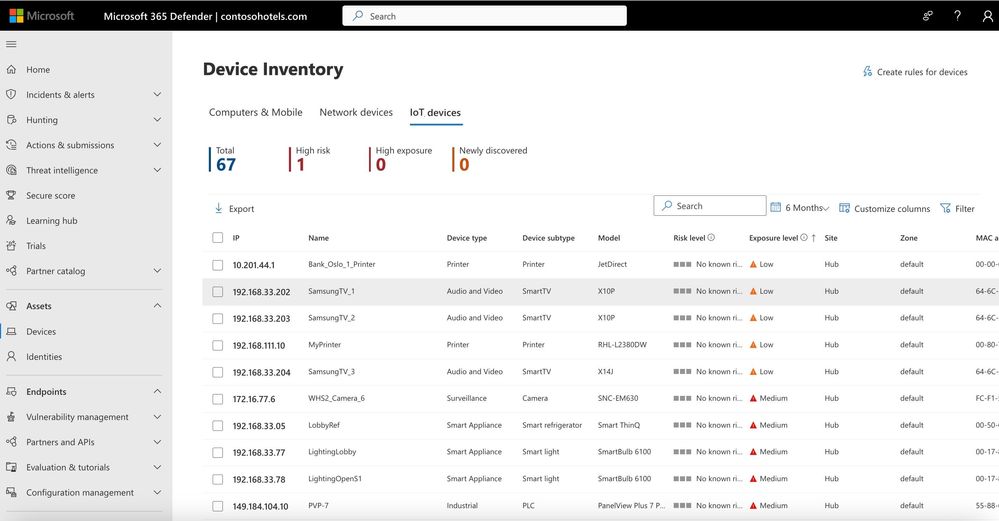
Once IT and eIoT endpoints are discovered with the Defender for Endpoint agent, the detected devices will populate a combined Device Inventory. This new experience enables security teams to seamlessly visualize and move across all IT and eIoT devices found on the network.
Manage vulnerabilities and remediate at-risk eIoT
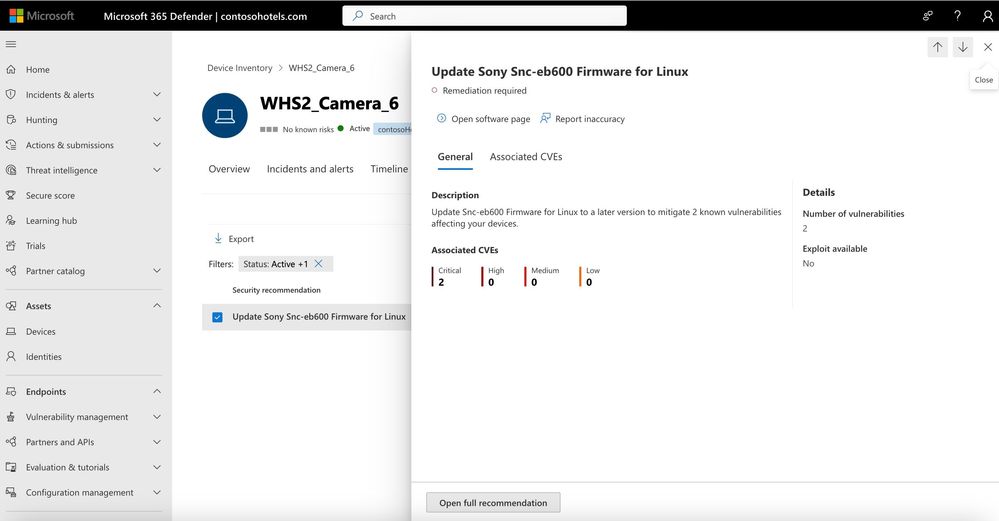
Now that the endpoints have been discovered, it’s time to prioritize securing the devices most at risk. By merging Defender for IoT – Enterprise IoT security into the Defender portal, security teams will now be able receive vulnerability assessments and tailored recommendations for managing at-risk eIoT devices.
Licensing overview
What is changing?
- Microsoft Defender for IoT is being changed from a consumption-based payment model in the Azure portal, to a per device per month licensing model as part of Microsoft 365.
- Microsoft Defender for IoT is now available for new and existing customers of Microsoft 365 E5 and E5 Security. The new license included provides coverage for up to 5 enterprise IoT devices per eligible user license at no additional cost.
What if I’m an existing Defender for IoT customer?
For customers with both Defender for IoT and E5 licenses:
If you are an existing Defender for IoT customer using the Azure-based payment model and an E5 customer, you will have access to coverage for up to 5 enterprise IoT devices per eligible user license and no longer be charged for that coverage.
For customers who have Defender for IoT but are not an existing E5 customer
If you are an existing Defender for IoT customer and are currently using the Azure-based payment model, you can continue to use the existing plans and will not see a change in your billing.
For more details reach out to your Microsoft account team.
Start a trial today!
For customers with Microsoft Defender for Endpoint, you can start a 90-day trial to try these capabilities now.
Let us know what you think!
We are excited to make it easier for organizations to secure both their IT and eIoT devices more easily and help them defend against the evolving threat landscape. Let us know what you think in the comments below. We take all feedback into consideration as we work to enhance your security experience.
Learn more about enterprise IoT security with Defender for IoT
- Learn more about Microsoft 365 E5
- Start securing IoT devices in the enterprise
- Read the enterprise IoT security FAQ
- Learn more about Defender for IoT billing
- Discover how Microsoft can help secure OT devices
Sources
2 Transforma Insights. (2023, October 23). Current IoT Forecast Highlights. https://transformainsights.com/research/forecast/highlights
1 Petrov, C. (2023, September 19). 49 Stunning Internet of Things Statistics to Know in 2023. Techjury. https://techjury.net/blog/internet-of-things-statistics/
Published on:
Learn moreWe can help you with Enterprise IoT security with Defender for IoT now included in Microsoft 365 E5 and E5 Security plans
If you want help implementing, troubleshooting, or improving this product, contact us and we’ll point you in the right direction.
Related posts
Monthly news - November 2024
Microsoft Defender XDRMonthly newsNovember 2024 Edition This is our monthly "What's new" blog post, summarizing product updates and v...
Monthly news - August 2024
Microsoft Defender XDRMonthly newsAugust 2024 Edition This is our monthly "What's new" blog post, summarizing product updates and var...
Defender for Identity: the critical role of identities in automatic attack disruption
In today's digital landscape, cyber-threats are becoming increasingly sophisticated and frequent. Advanced attacks are often multi-workload an...
New Security Copilot skill: Identity Summary
“Can you summarize Defender insights about this user over the last two days?” Microsoft’s latest innovation for Copilot for Security, sim...
Demystify potential data leaks with Insider Risk Management insights in Defender XDR
In today's complex security landscape, understanding and mitigating data exfiltration risks is more critical than ever. Earlier this year, we ...
Monthly news - October 2024
Microsoft Defender XDRMonthly newsOctober 2024 Edition This is our monthly "What's new" blog post, summarizing product updates and va...
AI-Driven Guided Response for SOCs with Microsoft Copilot for Security
In today's evolving cybersecurity landscape, security operation centers (SOCs) are constantly bombarded with incidents ranging from minor aler...
Identity Summary: New Security Copilot skill within Defender XDR
“Can you summarize Defender insights about this user over the last two days?” Microsoft’s latest innovation for Copilot for Security, sim...
Detecting browser anomalies to disrupt attacks early
Detecting browser anomalies is crucial for early identification and prevention of cyber threats, preventing data breaches and attacks by monit...
Microsoft Defender for Identity: the critical role of identities in automatic attack disruption
In today's digital landscape, cyber-threats are becoming increasingly sophisticated and frequent. Advanced attacks are often multi-workload an...