
Azure Deployment Environments is now generally available
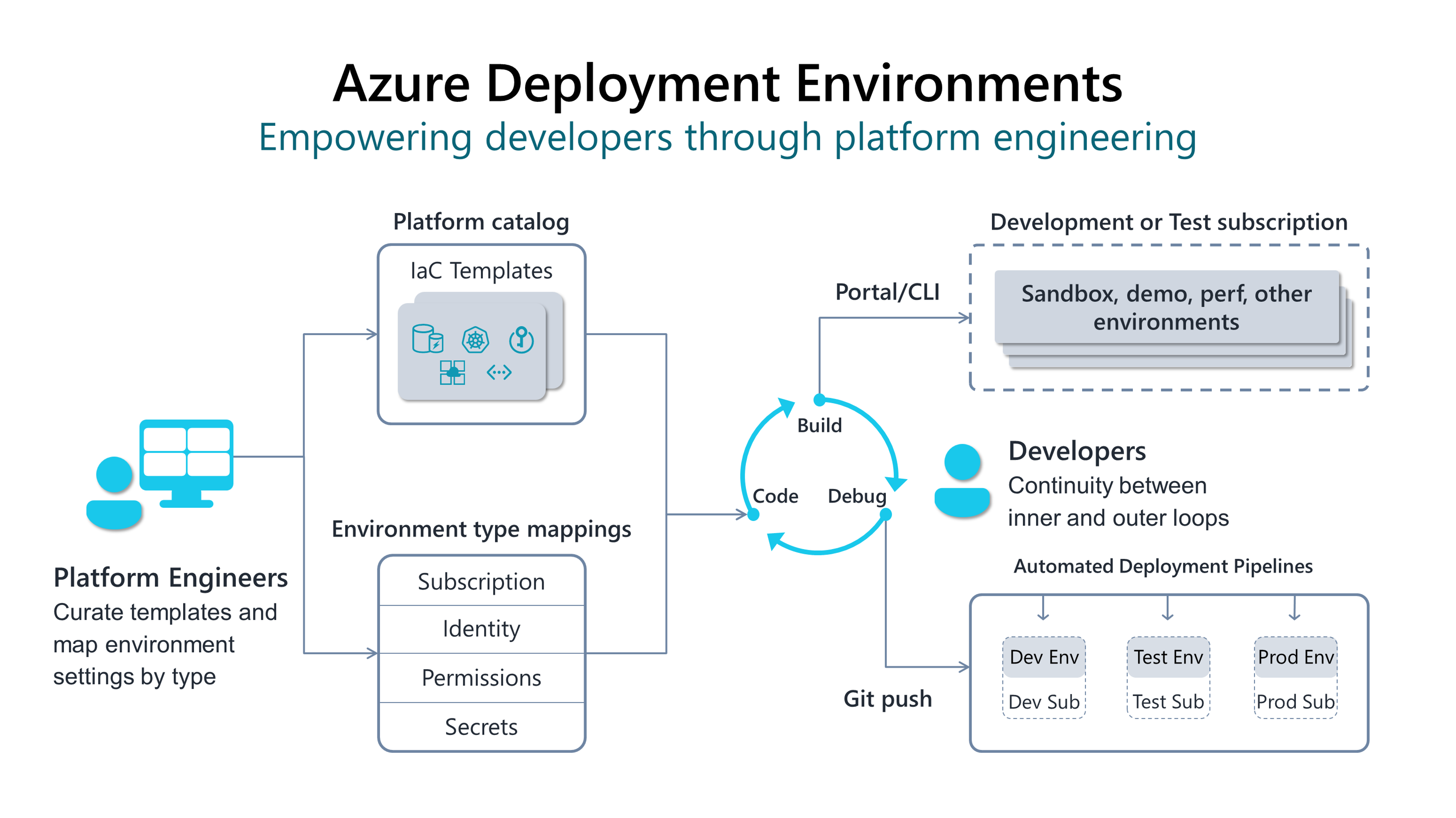
Last year at Build, we announced a new product called Azure Deployment Environments, a service that enables developers to quickly spin up app infrastructure with project-based templates. Since then, we’ve worked closely with over 30 organizations from industries like financial services, retail, automotive, and more. Thanks to their indispensable feedback, we’ve added several valuable features and capabilities that help enterprise developers maximize their productivity and focus on writing the code only they can write. Now, we’re excited to announce that Azure Deployment Environments is generally available, and you can start using the service for free today.
Azure Deployment Environments—a journey seven years in the making
Our journey to Azure Deployment Environments didn’t just start last year at Build—today’s announcement represents the culmination of over seven years of learning, starting way back in 2016 with Azure DevTest Labs. For a long time, we’ve noticed the inefficiencies around how developers gain access to infrastructure, and these challenges have only gotten worse.
Modern applications often leverage many cloud services, and configuring these environments takes valuable time away from developers who could otherwise be focused on the code that only they can write—and that's assuming they have permissions to access cloud subscriptions in the first place. If not, they must go through platform engineering teams or IT admins. Unfortunately, this approach doesn’t scale, often resulting in delays that last days—if not weeks. Worse, any misconfigurations can result in errors and security vulnerabilities that lead to more delays and higher risk.
Azure DevTest Labs was our first major step towards solving the challenges of app development infrastructure, enabling development teams to self-serve preconfigured virtual machines (VMs) for a variety of development and testing use cases. Over the years, customers were drawn to DevTest Labs for its marriage of self-service access for developers and guardrails for the organization. By working closely with these customers, we identified three core values that are imperative for enterprise organizations when it comes to cloud-based infrastructure:
- Speed: does it give developers fast, self-service access to the infrastructure they need?
- Usability: does it meet developers’ needs and provide them with a satisfying experience
- Governance: does it enable platform engineers and other admins to maintain centralized visibility and management?
Since DevTest Labs first came out, apps have only gotten more complex with PaaS and Serverless. We’ve seen a strong customer need for a turnkey solution that provides self-service capabilities within enterprise guardrails.
Supporting developers and platform engineers alike with Azure Deployment Environments
Azure Deployment Environments builds on these learnings by empowering developers to self-serve the environments they need from project-based infrastructure-as-code templates—all while maintaining centralized management and governance. Developers gain fast, easy access to their environments through on-demand or automated deployment. If a developer has an idea on how to make their environments better, they can edit and submit their own templates via a pull request to the infrastructure-as-code template repo—helping promote best practices and InnerSource among teams.

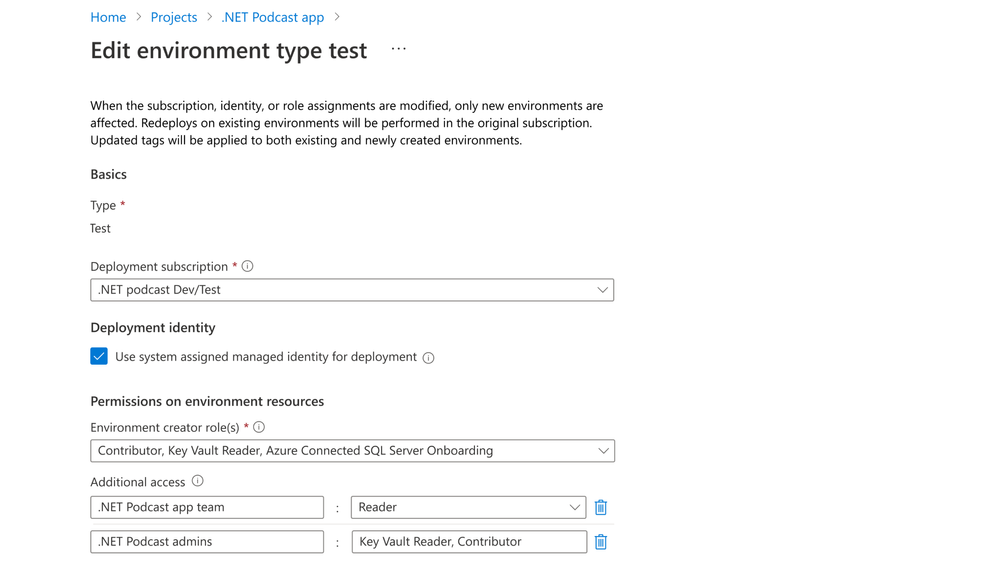
By enabling self-service deployment for developers, Azure Deployment Environments also benefits platform engineers and other admins, eliminating redundant work while giving them centralized control to keep environments secure and cost effective. Rather than repeatedly provisioning environments for different developers, platform engineers provide developers with a catalog of standardized, pre-approved templates, promoting collaboration and knowledge sharing. Platform engineers can also predefine which roles can deploy which types of environments—whether dev, test, staging, or production—and ensure they’re deployed in the right subscription or management group with all the policies and cost controls that entails.
New features in general availability
Already in public preview, developers can deploy new environments through the terminal in their code editor or as part of a GitOps workflow. Now in general availability, developers can view, deploy, and manage their environments all from a custom developer portal—that also houses cloud-based workstations available through Microsoft Dev Box.

We are also announcing support for Terraform infrastructure-as-code files in Azure Deployment Environments —customers can sign up for early access today. The service already supports Azure Resource Manager (ARM) templates; adding Terraform support means that customers who use Terraform will be able to directly import their existing templates into Azure Deployment Environments. Support for other infrastructure-as-code formats—including Pulumi and Ansible—is on the backlog.
To enable a seamless developer experience across products, we’re also working on an integration between Azure Deployment Environments and the Azure Developer CLI (azd). With this integration, enterprise developers will be able to leverage azd to provision app infrastructure using Azure Deployment Environments and, easily deploy app code onto the provisioned infrastructure.
Getting started with Azure Deployment Environments
You can start using Azure Deployment Environments for free in general availability and sign up for early access to Terraform support. If you have questions on how to get started, visit the quick start guide.
Find out more about the latest in Azure Deployment Environments and see the service in action by watching our Azure Deployment Environments session at Build 2023.
Sagar Lankala
Senior Product Manager, Developer Division
Published on:
Learn moreWe can help you with Azure Deployment Environments is now generally available
If you want help implementing, troubleshooting, or improving this product, contact us and we’ll point you in the right direction.
Related posts
This Month in Azure Static Web Apps | 09/2024
We are back with another edition of the Azure Static Web Apps Community! :party_popper: September was yet another month ...
GitHub Copilot for Azure: 6 Must-Try Features
As developers, we are constantly seeking tools that streamline our workflows and boost productivity. … Enter GitHub Copilot for Azure, now in ...
Responsible AI Mitigation Layers
Generative AI is increasingly being used in various kinds of systems to augment humans and infuse intelligent behavior into existing and new a...
Streamline Your Azure Workflow: Introducing GitHub Copilot for Azure in VS Code
I'm excited to announce the public preview of GitHub Copilot for Azure - a new addition to your toolkit that seamlessly integrates with G...
Build Intelligent Apps Code-First with Prompty and Azure AI
Building Generative AI applications can feel daunting for traditional app developers. What does the end-to-end applicati...
Certificación AI-900 (Fundamentos de IA) con Chicas en IA
La inteligencia artificial ha llegado para quedarse, ¡y más aún con la revolucionaria IA generativa! Para ayudar a los profesionales a especia...
Get certified with Learn Live GitHub series!
GitHub Universe is coming, and Microsoft and GitHub are partnering to offer a new special Learn Live series in Brazilian Portuguese, English a...
Certifícate con Learn Live GitHub en Español
Microsoft y GitHub se han unido para ofrecer una nueva serie especial de Learn Live en inglés y español: GitHub 2024. Del 10 al 24 de Octubre,...
Evaluating generative AI: Best practices for developers
As a developer working with generative AI, you've likely marveled at the impressive outputs your models can produce. But how do you ensure the...
Introducing Azure Product Retirement Livestreams
The Azure Retirements team, in collaboration with key partner groups, is excited t...