
WhatsApp Business Platform now available for applications built on Azure

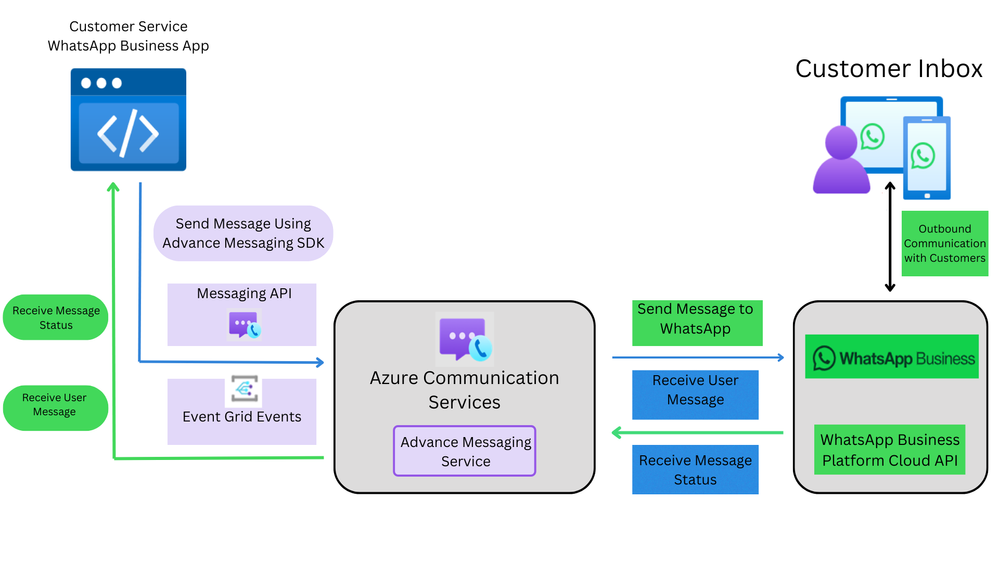
We are excited to announce that Azure Communication Services Advanced Messaging is now generally available, enabling developers to send and receive messages from their applications through third party social messaging platforms, like the WhatsApp Business Platform. This latest messaging service helps businesses create intelligent B2C communication workflows to reach more customers at scale and deliver safe, reliable communications to customers worldwide.
“Azure Communication Services enables brands to reach more customers across devices and platforms. We are delighted to expand that reach to the WhatsApp Business Platform for Azure, where developers can build intelligent applications that improve customers’ interactions. Combined with services from Azure AI, we are transforming the landscape of communication and helping businesses meet the growing demands of their global customers.” -Bob Serr , VP of Engineering, Azure Communication Services.
Build on your terms with Azure and effortlessly connect with WhatsApp users
As one of the most popular messaging apps, businesses can now communicate with WhatsApp users directly from their Azure applications, enabling efficient and effective communication with their target audiences that prefer effortless, personalized, and secure communications with their favorite brands. Developers can seamlessly connect applications and bots to interact with customers programmatically as well as benefit from the promises of building with Azure:
- Global reach: WhatsApp users span across 180 countries worldwide. Tap into this global audience with Advanced Messaging.
- Security: Advanced Messaging ensures safe, reliable delivery, maintaining the privacy and security of your communications.
- Scalability: No matter the volume of messages your business requires, Advanced Messaging scales effortlessly to meet your needs.
Incorporate WhatsApp into key customer service and communication scenarios
With Advanced Messaging from Azure Communication Services, developers can build conversational workflows for their key customer scenarios by communicating with users on WhatsApp who want simple, customized, and safe interactions with their preferred brands. For example, instantly send notifications and follow-ups for appointment reminders, transaction receipts, shipping updates, or one-time passcodes. Or provide real-time support to quickly resolve customer issues.
Build intelligent, multichannel communication workflows with Azure AI
The Azure OpenAI Service and Azure Communication Services Job Router can be used in combination with the WhatsApp Business Platform to analyze and route messages, delivering faster, personalized communication and streamlining customer service. See the latest code samples for how Azure AI and Azure Communication Services are reimagining customer support and business insights: Azure Communications Services and Azure Open AI Reimagine Customer Support and Business Insights - Microsoft Community Hub
In addition, developers can also build multichannel experiences with WhatsApp and other communication channels, such as SMS, email, chat, voice, and video, using Azure Communication Services.
Getting started:
Register your WhatsApp Business Platform account. QuickStart: Register a WhatsApp Business Account
Explore the technical documentation:
- Advanced Messaging overview : Understand the capabilities and features.
- QuickStart: Try Advanced Messaging Sandbox : Get hands-on experience in a sandbox environment.
- QuickStart: Send WhatsApp Messages : Learn how to send messages programmatically.
Published on:
Learn moreWe can help you with WhatsApp Business Platform now available for applications built on Azure
If you want help implementing, troubleshooting, or improving this product, contact us and we’ll point you in the right direction.
Related posts
Azure Communication Services Ideas Board: Share your feedback with the product team
Innovation is not a solitary pursuit, and we recognize that some of the best ideas come from you, our Azure Communication Services community. ...
Engage with the Azure Community Services Ideas Board: Your Voice Matters
Innovation is not a solitary pursuit, and we recognize that some of the best ideas come from you, our Azure Communication Services community. ...
Part 2 - Multichannel notification system using Azure Communication Services and Azure Functions
In the first part of this topic, we setup all the Azure resources like the Azure Communication Services for Email, SMS, WhatsApp for...
Part 1 - Multichannel Notification System with Azure Communication Services and Azure Functions
In the interconnected digital era, it's crucial for businesses and services to communicate effectively with their audience. A robust notificat...
Building a WhatsApp AI bot for customer support
Building a WhatsApp AI Bot for customer support In this blog post, we’ll explore how to build a customer support application that integ...
Azure Communication Services September 2024 Feature Updates
The Azure Communication Services team is excited to share several new product and feature updates released in August 2024. (You can view previ...
Azure Communication Services at the DEVIntersection Conference
Join us for the DEVintersection Conference from September 10 to 12, 2024, in Las Vegas, Nevada. This event gathers technology enthusiasts from...
Azure Communication Services June 2024 Feature Updates
Data Retention with Chat threads Developers can now create chat threads with a retention policy between 30 and 90 days. This feat...
Azure Communication Services August 2024 Feature Updates
The Azure Communication Services team is excited to share several new product and feature updates released in July 2024. (You can view previou...
Anywhere365 integrates Azure Communication Services into their Dialogue Cloud Platform
Every day, companies aim to help their customers realize the most value from their products and services. They do this by providing ef...