
Introducing Azure Communication Services UI Library to React Native


Overview
Today we are excited to share our first efforts with cross-platform development, to help React Native developers to add calling capabilities into their current application following the release of Calling Composite experience on mobile platforms earlier this year.
We have created a React Native sample showcasing how to introduce calling capabilities into React Native cross-platform applications. If you have a React Native application and would like to add calling capabilities, follow our sample app to see how you can easily integrate the Azure Communication Services (ACS) Calling Composite in your app. The Calling Composite experience of the ACS UI Library empowers developers to build modern communication user experiences quickly using ACS native SDK.
Native Module
The React Native app needs to create a Native Module which allows the application to communicate and use the native ACS (Azure Communication Services) UI Library's functionality. To quickly add a prebuilt native module in the project, take a look at our bridging guide.
The Native Module is constructed through adding the native ACS UI Library dependency in your React Native project through Maven and CocoaPods for your Android and iOS project.
iOS
We have a swift file (RNAzureCommunicationUICalling.swift) that contains all the methods that will call the native iOS ACS UI Library. We wrap the methods we want to expose to the React Native end with @objc. Since the native library is written entirely in Swift, a bridging header file is needed to create a Native Module. The bridging header file wraps the original Swift framework and defines the public interface consumed by the React Native end.
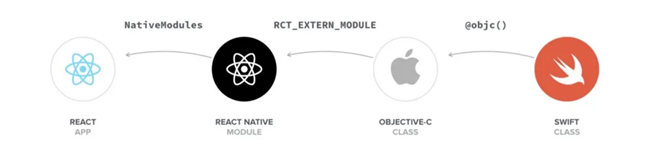
We import RCTBridgeModule in (RNAzureCommunicationUICalling.m) which provides us with an interface to register our bridge module. We export the swift module we created with RCT_EXTERN_MODULE. We also export our methods that we want to expose from the React Native Application with RCT_EXTERN_METHOD.
Android
We have a Java file (RNAzureCommunicationUICalling.java) that contains all the methods that will call the native Android ACS UI Library. We wrap the functions we want to allow the React Native end to access with @ReactMethod. This will allow the React Native end to call the function which launches the native Communication UI Library.
We then register our RNAzureCommunicationUICalling module in React Native in (RNAzureCommunicationUICallingPackage.java) file which implements ReactPackage. This provides us with an interface to register our native module to be referenced from the React Native end.
Consuming the Native Module
Now that we have created the Native Module, our cross-platform application is now ready to integrate with the UI library. We can now reference the Native Module from our JavaScript end and launch the Calling Composite experience. We now have audio and video experience embedded in our cross-platform React Native application. To have audio & video calling capability in your React-Native application, follow or refer to the above description or our sample React-Native app for implementing the Native Module.
Congratulations! Your app can now launch the native UI Calling Composite.
Learn More
The sample app has detailed instructions and examples of how developers can create bindings and showcases how a React Native application would use the bindings. Please visit our Github Repository to learn more.
To learn more about the Azure Communication Services (ACS) UI Library, please refer to our UI Library Overview page for mobile platforms.
Published on:
Learn moreWe can help you with Introducing Azure Communication Services UI Library to React Native
If you want help implementing, troubleshooting, or improving this product, contact us and we’ll point you in the right direction.
Related posts
Azure Communication Services Ideas Board: Share your feedback with the product team
Innovation is not a solitary pursuit, and we recognize that some of the best ideas come from you, our Azure Communication Services community. ...
Engage with the Azure Community Services Ideas Board: Your Voice Matters
Innovation is not a solitary pursuit, and we recognize that some of the best ideas come from you, our Azure Communication Services community. ...
Part 2 - Multichannel notification system using Azure Communication Services and Azure Functions
In the first part of this topic, we setup all the Azure resources like the Azure Communication Services for Email, SMS, WhatsApp for...
Part 1 - Multichannel Notification System with Azure Communication Services and Azure Functions
In the interconnected digital era, it's crucial for businesses and services to communicate effectively with their audience. A robust notificat...
Building a WhatsApp AI bot for customer support
Building a WhatsApp AI Bot for customer support In this blog post, we’ll explore how to build a customer support application that integ...
Azure Communication Services September 2024 Feature Updates
The Azure Communication Services team is excited to share several new product and feature updates released in August 2024. (You can view previ...
Azure Communication Services at the DEVIntersection Conference
Join us for the DEVintersection Conference from September 10 to 12, 2024, in Las Vegas, Nevada. This event gathers technology enthusiasts from...
Azure Communication Services June 2024 Feature Updates
Data Retention with Chat threads Developers can now create chat threads with a retention policy between 30 and 90 days. This feat...
Azure Communication Services August 2024 Feature Updates
The Azure Communication Services team is excited to share several new product and feature updates released in July 2024. (You can view previou...
Anywhere365 integrates Azure Communication Services into their Dialogue Cloud Platform
Every day, companies aim to help their customers realize the most value from their products and services. They do this by providing ef...