
Required permissions while creating Event Grid System Topic

While creating Event Grid System Topic for specific resource type by using Terraform deployment, we may get following error message which indicates that we don’t sufficient permission upon target resource (for example, Storage Account resource type):
Error: eventgrid.SystemTopicsClient#CreateOrUpdate: Failure sending request: StatusCode=400 -- Original Error: Code='InvalidRequest' Message='The user does not have permission to perform the operation on the resource /subscriptions/***/resourceGroups/***/providers/Microsoft.Storage/storageAccounts/***.'
Or we may get following error message:
checking for presence of existing System Topic: (Name "***" / Resource Group "***"): eventgrid.SystemTopicsClient#Get: Failure responding to request: StatusCode=403 -- Original Error: autorest/azure: Service returned an error. Status=403 Code="AuthorizationFailed" Message="The client *** with object id ***' does not have authorization to perform action 'Microsoft.EventGrid/systemTopics/read' over scope '/subscriptions/***/resourceGroups/***/providers/Microsoft.EventGrid/systemTopics/*** or the scope is invalid. If access was recently granted, please refresh your credentials."
Or we will get following error message while creating event grid system topic in the azure portal:

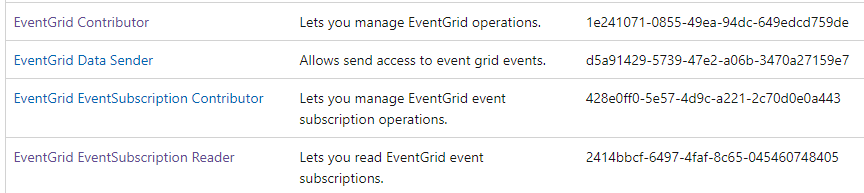
To solve these exceptions, please kindly make sure that EventGrid Contributor and EventGrid EventSubscription Contrinbutor(RBAC permission link) are granted to the client user or service principal object correctly.
- The EventGrid Contributor and EventGrid EventSubscription Contributor allow us to create/manage EventGrid resources and EventGrid EventSubscription resources. It’s used for control plane operation.
- The EventGrid Data Sender is used for data plane operation which allows us to send message into event grid topic. Meanwhile, EventGrid EventSubscription Reader role allows us to receive message/event from event subscriptions.
In addition, we don’t need to grant write permission of target resource provider to client user/service principal object while creating event grid system topic via ARM template or Terraform. Let’s say we are creating event grid system topic for Storage Account:
- The Storage Account Contributor role is not required for ARM template/Terraform deployments.
- However, it’s required while performing in the azure portal. The reason is we still need to list target Storage Account services over azure portal UI. Surely, you could remove the resource provider permission after creating Event Grid system topic due to original security(permission control) consideration.

Published on:
Learn moreWe can help you with Required permissions while creating Event Grid System Topic
If you want help implementing, troubleshooting, or improving this product, contact us and we’ll point you in the right direction.
Related posts
Azure Storage - TLS 1.0 and 1.1 retirement
Overview TLS 1.0 and 1.1 retirement on Azure Storage was previously announced for Nov 1st, 2024, and it was postponed recently to 1 year later...
Efficient Management of Append and Page Blobs Using Azure Storage Actions
Overview In Azure Storage, Blob Lifecycle Management (BLM) allows you to automate the management of your data based on rules defined by...
[Azure AI Search] Internal Server Error when creating CMK encrypted objects
Scenario Customers follow the Microsoft doc to create CMK encrypted objects (data source, index etc.), but get the 500 Internal Serv...
Optimizing Azure Table Storage: Automated Data Cleanup using a PowerShell script with Azure Automate
Scenario This blog’s aim is to manage Table Storage data efficiently. Imagine you have a large Azure Table Storage that accumulates logs from ...
Optimizing Azure Table Storage: Automated Data Clean-up using a PowerShell script with Azure Automat
Scenario This blog’s aim is to manage Table Storage data efficiently. Imagine you have a large Azure Table Storage that accumulates logs from ...
Restoring Soft-Deleted Blobs with multithreading in Azure Storage Using C#
Blob soft delete is an essential feature that safeguards your data against accidental deletions or overwrites. By retaining deleted data for a...
Performing simple Azure Table Storage REST API operations using curl command.
The blog provides guidance to perform simple Table Storage REST API operations such as Create table, Delete Table, Insert entity, Delete entit...
Bulk delete all the old jobs from the batch account
Deleting a Job also deletes all Tasks that are part of that Job, and all Job statistics. This also overrides the retention period for Task dat...
Utilizing Azure Storage and Runbooks for scheduled automated backups of Azure SQL Databases
In this article, we are going to provide detailed steps to create a scheduled Azure SQL Database backup to storage account using automation. T...
[Azure Service Bus] JMS messages getting dead-lettered
The article discusses a problem where numerous messages end up in the dead letter queue (DLQ) when the JMS service bus consumer connects to th...