
New capabilities in Microsoft Entra Verified ID now available

We’re only weeks away from general availability of Microsoft Entra Verified ID! Enterprises during the preview period are issuing and verifying credentials across a variety of scenarios, ranging from remote onboarding at work and collaboration across business boundaries to enabling education beyond the campus.
“Identity proofing by leading identity verification partners, in the form of Verifiable Credentials, will help reduce the remote onboarding time for our new employees from as much as 3 days [today] to as little as 10 minutes—all while improving the employee experience and making a great ‘first’ impression!” – Autodesk
I’m thrilled to share additional preview features aimed at making it easier for issuers and verifiers to exchange credentials in a trustworthy manner. As described in our previous blog post, we’re extending these new capabilities for any Microsoft customer.
What’s new
Quickly issue a Verifiable Credential for directory-based claims
Based on customer feedback, in addition to managing Custom Credentials, we’re excited to share that you can now use the Quick Start option to configure the look and feel based on directory-based claims. Directory-based claims (e.g., Azure AD) have been used to power profile cards in M365 for a long time. You can configure and tap into these claims using Microsoft Graph to create Verified Credentials for a wide variety of use cases, such as a verified employee.
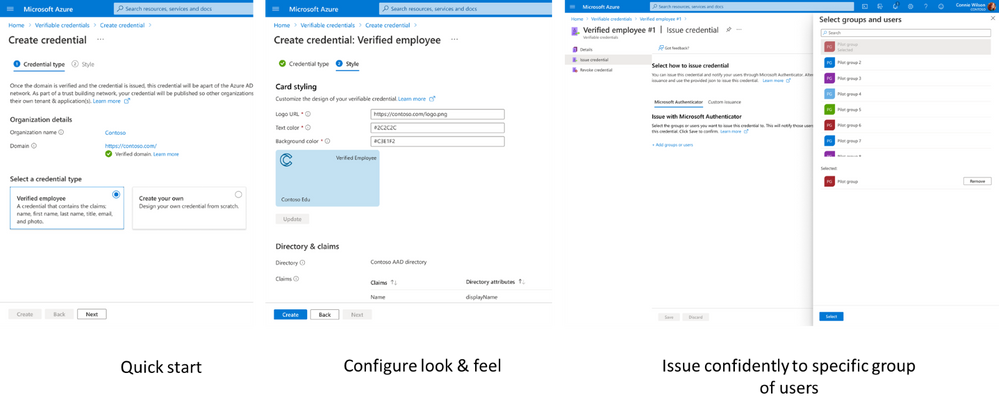
Enterprises can issue Verifiable Credentials to existing users of Microsoft Authenticator (or any other standards-compliant wallet). Admins can enable Authenticator users to accept these credentials with just one click!
Verifiable Credentials Network
We are thrilled to offer Verifiable Credentials Network so developers can discover their preferred issuer of credential types, e.g., Verified Student by Contoso University using portal for administrators or APIs. Anyone using the free version of Azure AD can now easily request and verify credentials without requiring any custom integration with issuers.
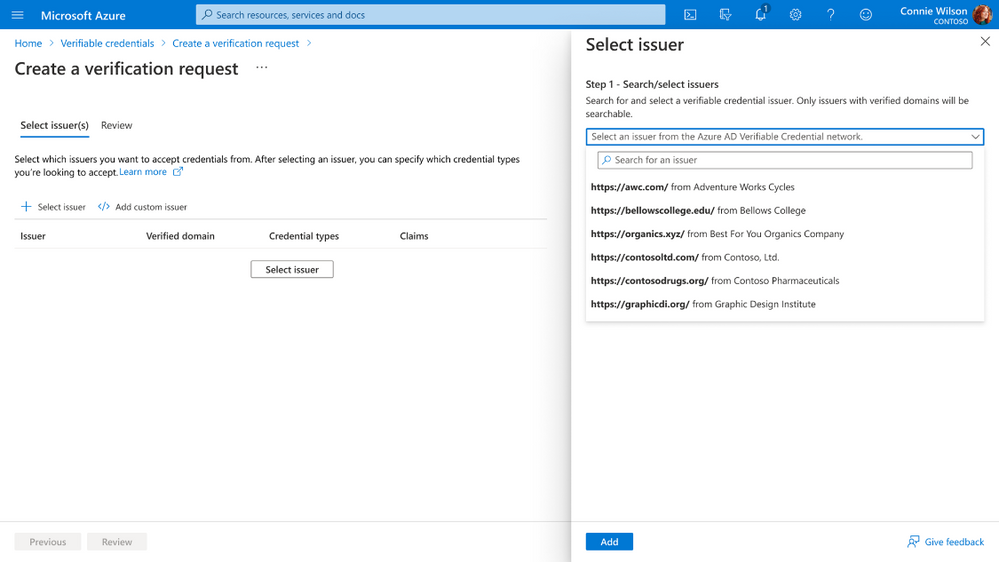
APIs for developers and administrators
Developers can use APIs for Verifiable Credential Network to discover credential types and choose their preferred issuer (e.g., student ID credentials by Contoso University). In addition, developers can use Request API to programmatically issue and verify credentials so developers can quickly integrate verifiable credentials into new and existing apps. Samples are available in .net, Java, Node.JS, and Python, illustrating how to use the Request API. In addition, using the Admin API, administrators can automate everything from onboarding your tenant to creating issuers, to managing the look and feel of credentials.
Recovering from loss of device using backup and restore

MS Authenticator users can now recover Verifiable Credentials in the event of a loss of device. Users can export their credentials and secure the exported file using a pass phrase to ensure that only you can access your encrypted credentials. If you lose your phone, you can use Microsoft Authenticator on the new device to import credentials using the file, along with the passphrase.
Thank you for your feedback
We enjoy hearing thoughts and reactions from the community, so please let us know what you think in the comments below, on Twitter (@AzureAD) or in the Azure Feedback Forum. Please check out documentation for further details.
Getting started
- Full list of updates: See what’s new in the public preview release
- Customer stories and Verifiable Credentials resources at aka.ms/verifyonce
- Understand the basics of decentralized identity via our five-part blog series
- Quick overview: http://aka.ms/didexplained
- Documentation for developers: http://aka.ms/didfordevs
- Get involved with http://identity.foundation, an industry working group for all things Decentralized ID (DID)
Learn more about Microsoft identity:
- Microsoft Entra Announcement
- Return to the Azure Active Directory Identity blog home
- Join the conversation on Twitter and LinkedIn
- Share product suggestions on the Azure Feedback Forum
Published on:
Learn moreWe can help you with New capabilities in Microsoft Entra Verified ID now available
If you want help implementing, troubleshooting, or improving this product, contact us and we’ll point you in the right direction.
Related posts
Sync identities from Rippling to Microsoft Entra ID
Today, we’re thrilled to announce that customers using Rippling HCM can now automatically provision users to on-premises Active Directory and ...
Microsoft Entra ID Governance for government
I’m pleased to announce that as of November 1, 2024, Microsoft Entra ID Governance is available for federal agencies, state and local governme...
Update to security defaults
As part of the Secure Future Initiative, we’ve evolved our security approach to align with three security principles: secure by design, secure...
Meet Microsoft Entra at Ignite 2024: November 18-22
Microsoft Ignite is just around the corner, taking place from Monday, November 18, 2024 through Friday, November 22, 2024, in Chicago, Illinoi...
Manage Microsoft Entra ID role assignments with Microsoft Entra ID Governance
I’m excited to announce that we now support Microsoft Entra role assignments in Microsoft Entra ID Governance's Entitlement Management feature...
The latest enhancements in Microsoft Authenticator
Hi folks, I'm thrilled to announce three major Microsoft Entra ID advancements that will help you protect your users with phishing-resi...
Microsoft Security announcements and demos at Authenticate 2024
The Microsoft Security team is excited to connect with you next week at Authenticate 2024 Conference, taking place October 14 to 16 in Carlsba...
What's new in Microsoft Entra - September 2024
We’re excited to announce the general availability of Microsoft Entra Suite—one of the industry’s most comprehensive secure access solutions f...
Explore the key benefits of Microsoft Entra Private Access
The traditional network security models are becoming increasingly ineffective in a world where remote work and cloud services are the norm. Co...
Join us at the Microsoft Entra Suite Showcase!
This fall, we are bringing the Microsoft Entra Suite Showcase to cities worldwide. Join us to explore how our latest advancements in secure id...