
Adaptive Card-based Loop components: Collaborate on live content in Teams and Outlook

Adaptive Card-based Loop components are live and actionable units of productivity that stay in sync and can move freely across Microsoft 365 apps, starting with Microsoft Teams and Outlook. At Microsoft Build, we announced a private preview for developers to create Adaptive Card-based Loop components, and the program was launched soon after in July 2022. Since the launch, we have seen a lot of interest from the developer community and have partnered with organizations such as SAP, Zoho, Smartsheet, GitHub, Viva Sales, Decisions and Priority Matrix to build experiences that will allow their users to bring live business and project data into chats and email messages, the collaboration hubs in the modern-day digital first and hybrid work culture. In this article, we are excited to share with you the variety of scenarios that our partners will be enabling with Adaptive Card-based Loop components and what customers will experience once we launch the public preview in early 2023.
Collaborate on Live Business Data
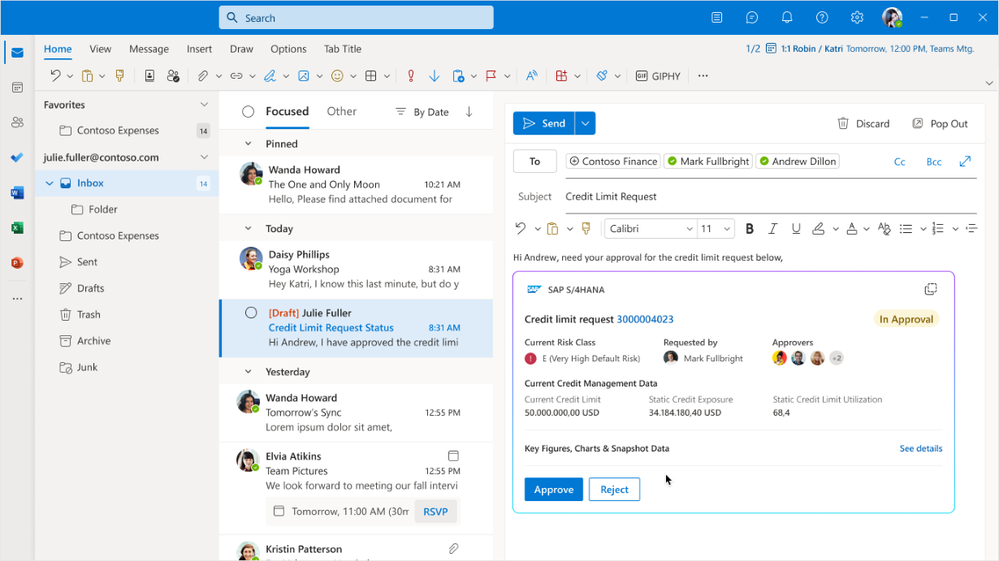
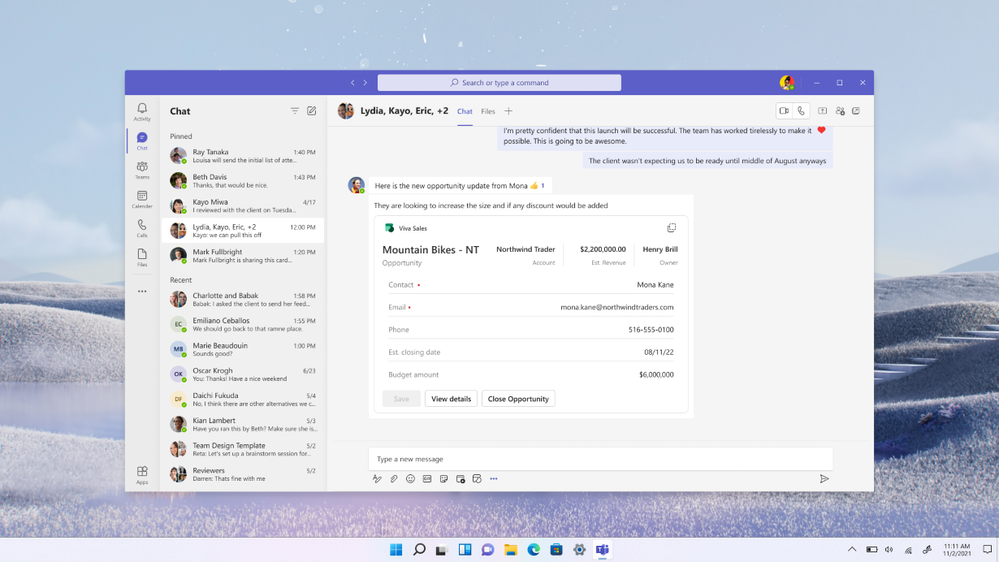
Partners like SAP S/4HANA Cloud and Viva Sales are building Teams apps and leveraging AC-based Loop components to share live business data such as a sales order, a sales opportunity or an account information in Teams chat messages and Outlook emails. With access to the latest data and the ability to complete simple actions inline, business teams will be able to easily collaborate on the next steps and resolve work items while staying in the flow of their work in Teams or Outlook.
Example 1: SAP S/4HANA Cloud customers collaborating to get credit limit approval to unblock a sales order
Example 2: Viva Sales customers collaborating to close on an opportunity
Collaborate on Projects and Tasks
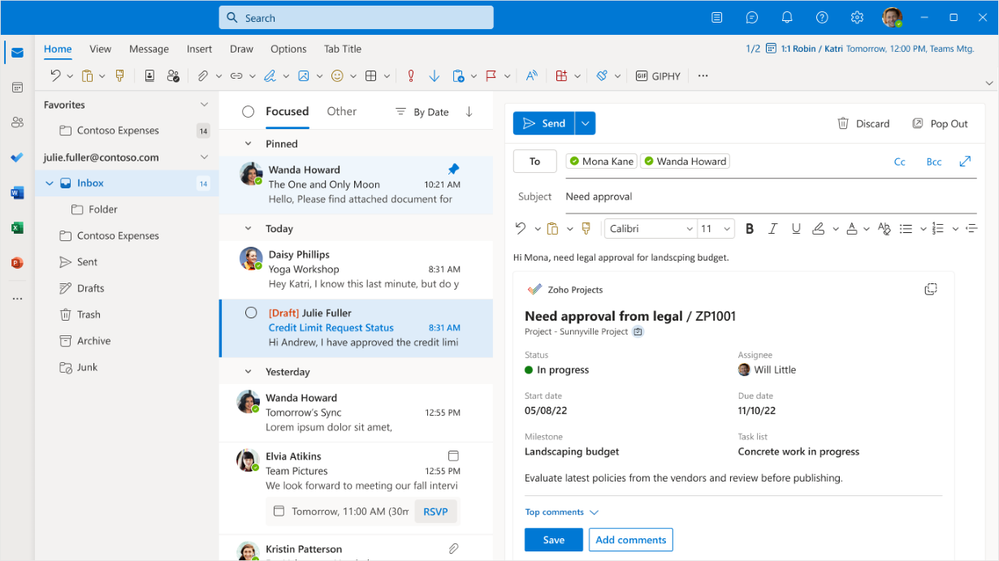
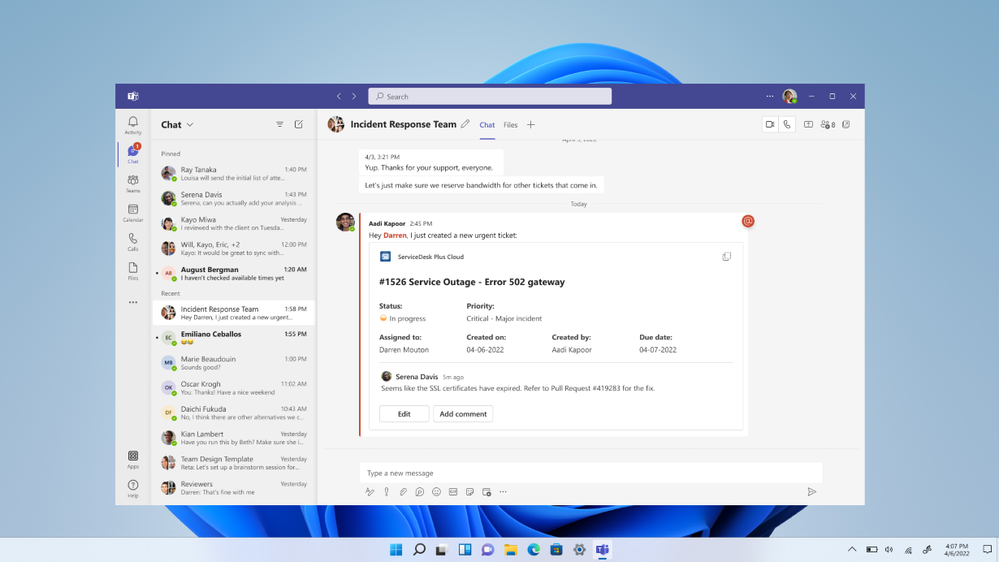
Zoho SDP, Zoho Projects, Smartsheet and a few other partners have made project and task management easier for their users by sharing Loop components with live task related information in Teams chats and Outlook emails. With distributed teams and hybrid work culture, it is ever more important to keep project and task related information up to date and AC-based Loop components makes it easier to share and update this information with your team directly in chats and emails and ensure that key fields are always reflecting the latest information. Here are some great examples of how our partners are making it easier to manage projects and tasks:
Example 3: AC-based Loop component from Zoho Projects
Example 4: AC-based Loop component for IT ServiceDesk tickets from Zoho SDP
Collaborate on Pull Requests and Bugs
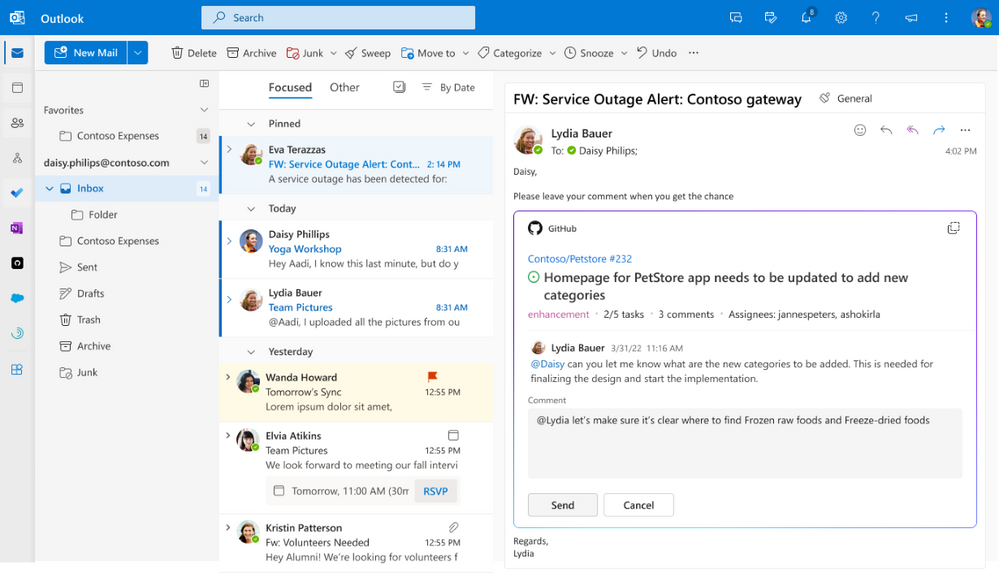
We have exciting news for developers and product owners. As part of this program, we have partnered with GitHub to build AC-based Loop components with key GitHub data. Developers will be able to share live PR and Issue information with their colleagues as the team tracks all the items towards an upcoming release or work on triaging and closing an issue.
Example 5: GitHub AC-based Loop component for PR tracking
AC-based Loop components empower users and are easy to build
Teams are often juggling with competing priorities and with coworkers working remotely or across different geographies and time zones, driving accountability and getting work done can often be challenging. Loop components make it easier for teams to collaborate on content from various apps and sources right within communication hubs such as Teams chat and Outlook messages. When you get a ping from your colleague asking for a follow-up, you no longer need to navigate to a different application to get all the context; the information you need is right there in the Loop component, making it easier for you to respond and saving you time.
If you are a user of one of the apps listed above and want to try these Loop components, we will be launching end user preview in early 2023. If you are interested in developing Loop components for your application, stay tuned for more on general availability of AC-based Loop components.
Continue the conversation by joining us in the Microsoft 365 community! Want to share best practices or join community events? Become a member by "Joining" the Microsoft 365 community. For tips & tricks or to stay up to date on the latest news and announcements directly from the product teams, make sure to Follow or Subscribe to the Microsoft 365 Blog space!
Published on:
Learn moreWe can help you with Adaptive Card-based Loop components: Collaborate on live content in Teams and Outlook
If you want help implementing, troubleshooting, or improving this product, contact us and we’ll point you in the right direction.
Related posts
Announcing the General Availability of the Microsoft 365 Document Collaboration Partner Program
Empowering Seamless Collaboration for Modern Workforces We are thrilled to announce the general availability of the Microsoft 365 Docume...
Favorite Copilot Prompts
(Amber Plumb interviewing Michael Morales and Allison Sweet) The power of M365 Copilot is transforming the way our support team operates...
Favorite Microsoft 365 Copilot Prompts
(Amber Plumb interviewing Michael Morales and Allison Sweet) The power of M365 Copilot is transforming the way our support team operates...
Boost digital event engagement with Voting and Archiving in Teams Q&A
Managing and delivering effective town halls is key to enabling two-way dialogue with leaders in today’s hybrid world. Microsoft Teams Q&A...
Prepare now for key end of support moments in 2025
One year from today, on October 14, 2025, support will end for all Office 2016 and 2019 suites, standalone apps, and servers. This includes:&n...
Everything you should know about Visio 2016 and Visio 2019 end of support
On October 14, 2025, Visio 2016 and Visio 2019 will reach end of support. After this date, Visio 2016 and Visio 2019 will no longer receive se...
Limit frontline worker access to Teams when off shift
We’re excited to announce that the frontline working time feature is now generally available! This feature allows admins to block or warn acce...
We are removing Feed on Microsoft 365 (Office)
As part of our ongoing efforts to streamline and enhance user experiences, we will be retiring the Feed feature (shown in figure 1 below) on t...
Leveraging Partner Apps to Deliver on the Promise of AI-Led Productivity
The advent of generative AI is driving a rethink of what outcomes we deserve from our productivity software – from gains in efficiency to more...
What’s new in FLW shared devices
Discover the Latest Enhancements in Shared Device Mode (SDM) We are excited to announce a series of new features in Shared Device Mode ...