
Exclude Public IP addresses in Azure DDOS network protection
Azure DDOS network protection provides security for services deployed in virtual networks against volumetric attacks by way of always-on traffic monitoring and adaptive real time tuning. This may be achieved by applying DDOS protection plans to the different virtual networks in the different architectural tiers such as the Hub and Spoke network, Windows N-tier and Paas Web App architectures.
Management of Azure services involves careful planning around available resources. One capability that is often requested by Azure DDoS protection customers is the ability to exclude certain public IP addresses from the protection plan to accommodate their prioritized workloads. For instance, public IPs attached to services in hybrid networking may be protected by DDoS plans in the hub or in the spoke virtual network depending on the type of architecture in use and the Public IP tier. A security administrator might also opt to use a DDoS IP protection SKU for certain workloads over DDoS Network protection.
The ability to exclude certain public addresses from the DDOS network protection plan is now available to customers. A security administrator can take advantage of this feature to enable or disable DDOS protection on specified public IP addresses in their virtual network. To use this feature,
- Log on to Azure Portal through https://preview.portal.azure.com (This is only available in the Preview portal at this time.)
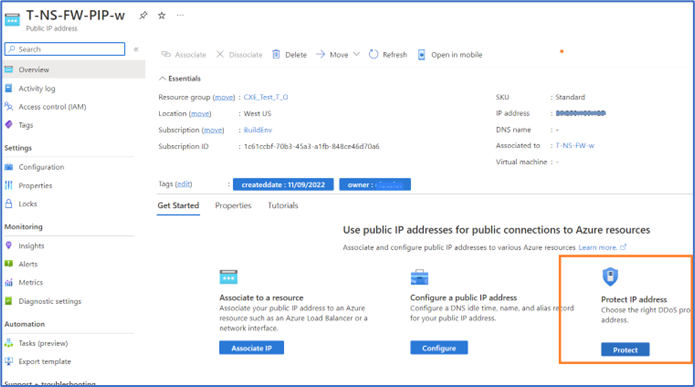
- Go to the Public IP resource
- Confirm Public IP SKU is Standard. (Available for Standard Public IP SKU)
- On the Overview page, Click Protect (Protect IP address)

Configure the public IP DDOS protection status using the options as shown below. When disabled, a notification on the current safety status of your network resources with be displayed. Note that “Disable” option will only work in regions where IP Protection SKU is available.

For more updates and announcement on Azure DDoS protection or Azure Network Security products, subscribe to the announcement channel via Azure blog
Resources:
What’s new in Azure Network Security at Microsoft Ignite 2022 - Microsoft Community Hub
Public preview: IP Protection SKU for Azure DDoS Protection | Azure updates | Microsoft Azure
Azure DDoS Protection Overview | Microsoft Learn
Published on:
Learn moreWe can help you with Exclude Public IP addresses in Azure DDOS network protection
If you want help implementing, troubleshooting, or improving this product, contact us and we’ll point you in the right direction.
Related posts
IPv6 Adoption: Enhancing Azure WAF on Front Door
The transition to IPv6 is a significant step for enterprise corporations, reflecting the evolution of internet technology and the need for a l...
Azure WAF’s Bot Manager 1.1 and JavaScript Challenge (Preview): Navigating the Bot Threat Terrain
Introduction Bots are a common presence on the internet, serving a range of functions from automating customer service to indexing page...
Private IP DNAT Support (Preview) and Scenarios with Azure Firewall
Introduction Azure Firewall is a cloud native security service to protect your workloads running in Azure. It is a stateful firewall as a serv...
Getting Started with Azure DDoS Protection REST API: A Step-by-Step Guide
REST API is a cornerstone in the management of resources on Azure, providing a streamlined and efficient approach for executing create, read, ...
Monitoring Azure DDoS Protection Mitigation Triggers
Monitoring Azure DDoS Protection Mitigation Triggers In today’s digital landscape, Distributed Denial of Service (DDoS) attacks pose a signifi...
Azure WAF’s Bot Manager 1.1 and JavaScript Challenge: Navigating the Bot Threat Terrain
Introduction Bots are a common presence on the internet, serving a range of functions from automating customer service to indexing page...
Utilizing Azure DDoS Protection Workbook for DDoS attack traffic Analysis
In today's digital age, the security of applications, servers, and networks is paramount. One of the most significant threats to this security...
Independent Configuration of Size Enforcement and Inspection Limits in Application Gateway WAF
Introduction In the constantly changing world of cybersecurity, both flexibility and effective security are essential for safeguarding ...
Private IP DNAT Support and Scenarios with Azure Firewall
Introduction Azure Firewall is a cloud native security service to protect your workloads running in Azure. It is a stateful firewall as a serv...
Monitoring traffic flows in Azure Firewall using Virtual Network Flow Logs
Azure Firewall is a managed service designed to protect your Azure Virtual Network resources, providing advanced threat protection and advance...