
Build custom incident response actions with Microsoft 365 Defender APIs

As a security analyst or incident responder, you not only want to closely observe everything happening in an environment, but also react quickly and efficiently once malicious activity is detected. While Microsoft 365 Defender has powerful detection capabilities, it also provides response actions at the file, device and user level, that can be triggered both manually and automatically.
During widespread security incidents, where threat containment is the number one priority, actions must be taken on multiple entities based on specific criteria. The ability to perform these actions quickly, ensures a timely response to threats and saves precious analyst and responder time.
Examples of such actions could be performing an antivirus scan of all devices with a certain file hash present, isolating all compromised devices based on an IR report provided as CSV, or tagging all devices running vulnerable version of software X. After these actions are performed, it is always nice to have some change log.
For some of the scenarios above, you may need to operate beyond the Microsoft 365 Defender user interface, and this is where automation with API comes in handy. Using the API and a programming language of your choice, you can make yourself a simple yet effective tool for taking actions on multiple entities based on the criteria selected from your incident investigation.
Microsoft 365 Defender has a rich and growing set of APIs. These APIs help you automate workflows and make full use of Microsoft 365 Defender capabilities. A feature-rich schema helps SOC and IR teams perform integrations and enable automation in their processes. For example, Security Operations Center (SOC) can leverage Machine Actions resource type to take actions on devices. These actions include Isolate, Run AV Scan, Restrict App Execution, or programmatically run Live Response sessions.
This blog post walks through a simple response tool that benefits from APIs and are using PowerShell as the tool of choice to perform actions in bulk. It doesn’t require installation and can easily be adapted by anyone with some scripting experience. In addition, PowerShell is a cross-platform language makes it easier for anyone to port to their platform of choice with minimal to no changes in the code.
To begin, we need access to the Microsoft 365 Defender API. Check out the following getting started guide which describes how to create an application, an application secret, and grant access to required APIs. You will need to follow the documentation on creating a new AppID and Secret and then make sure you provide the following App Permissions to your App.
|
Permission name |
Description |
|
AdvancedQuery.Read.All |
Run advanced queries |
|
Machine.Isolate |
Isolate the device |
|
Machine.ReadWrite.All |
Read and write all device information (used for tagging) |
|
Machine.Scan |
Scan the device |
Table 1: API permissions used by application.
This API-based tool has a simple PowerShell GUI with a series of numbered steps that’s intuitive to use.
- Specify application credentials created above and connect.
- Get devices on which you want to perform an action.
- Tag/Scan/Isolate all the selected devices.
- Export the log of all actions performed (if needed).
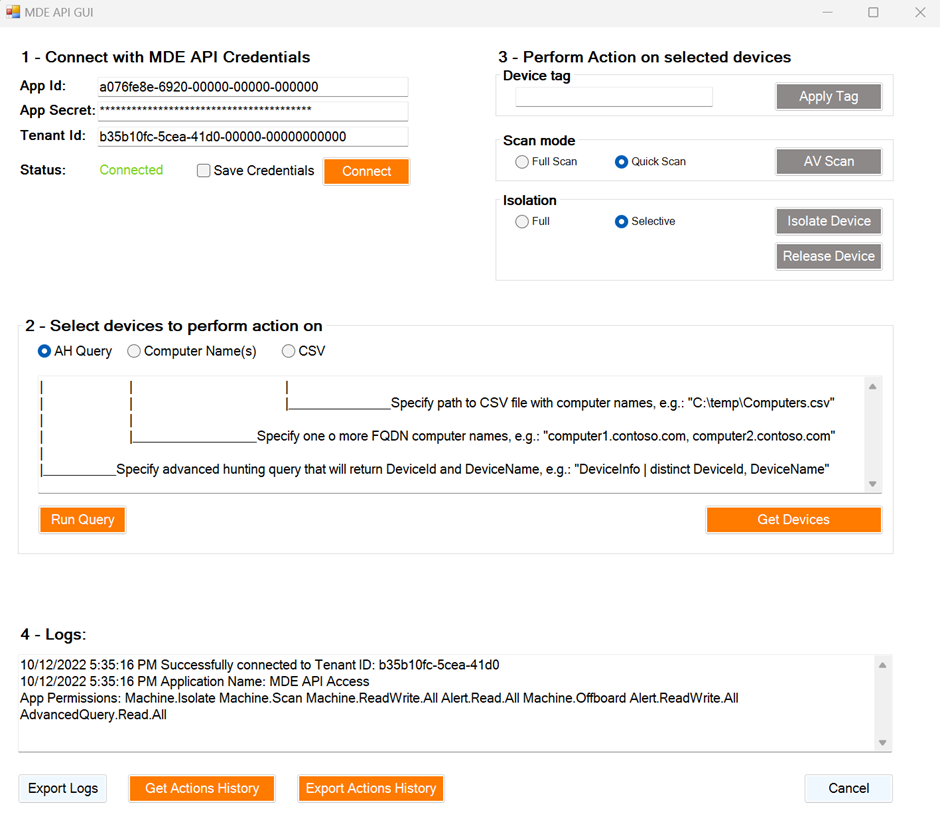
The tool currently accepts advanced hunting queries, computer names, and CSVs as device input methods. Once devices are selected, three types of actions can be performed:
- Tagging devices
- Performing Quick/Full AV scan, and
- Performing Isolation/Release from Isolation
The main benefit of a tool like this is the ability to perform actions in bulk and save time as a result. For example, a simple task of manually tagging 100 servers can take a lot of time using the security portal, especially if servers don’t share a common naming scheme. Instead, when using APIs it can be done in minutes. API usage also provides granular delegation capabilities. For example, a subset of users can be delegated an ability to run AV scans on devices even without having access to a portal.
In the screenshot below, you can see how all the devices running a vulnerable version of software can be quickly identified in the organization, scanned, and tagged while corresponding teams are busy installing patches.
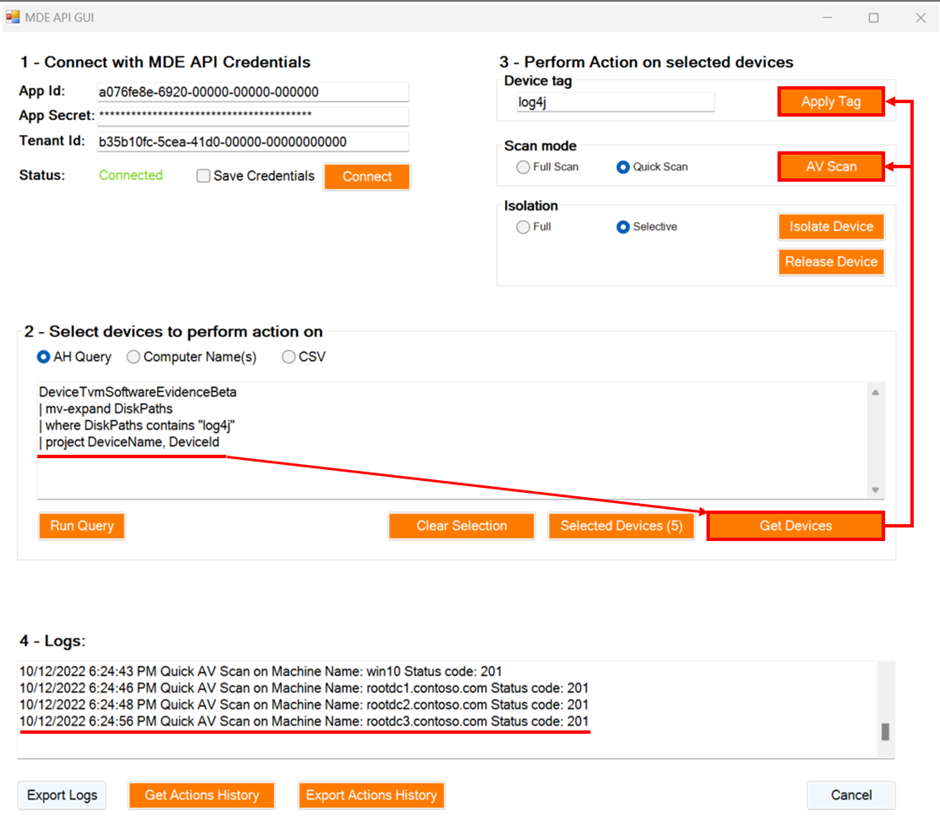
Currently the tool covers response actions against devices, but it can be further updated to support other response actions on files, users, and more. It can also be upgraded with user authentication to be better suited for enterprise usage and can be extended for many other scenarios that might be unique for your own team. We are releasing our code on GitHub so anyone can use it, contribute, fork it, and extend it but most importantly, share your feedback and your scenarios.
The is an impactful enabler for security teams looking for alternative ways to complete their tasks or integrate with other tools. The built-in API Explorer can be used to explore various APIs interactively and the tool we described in that blog and just released on GitHub can be used as a starting point or inspiration for building your own toolset.
More information
To learn more about the APIs in Microsoft 365 Defender, check out our documentation.
Timur Engin @timurengi contributed to this article.
Published on:
Learn moreRelated posts
February 2026 Update for Office 365 for IT Pros
The February 2026 (update #128) files for the Office 365 for IT Pros (2026 edition) eBook are available for current subscribers to download fr...
February 2026 Update for Office 365 for IT Pros
The February 2026 (update #128) files for the Office 365 for IT Pros (2026 edition) eBook are available for current subscribers to download fr...
Open Word, Excel, and PowerPoint Files in Microsoft 365 Copilot Chat
Starting early February 2026, Word, Excel, and PowerPoint files cited in Microsoft 365 Copilot Chat (web) will open directly within the chat i...
Drawn electronic signatures with eSignature for Microsoft 365
eSignature for Microsoft 365 will add a drawn signature option for signing PDFs, allowing use of stylus, touch, or mouse. Rolling out worldwid...
Viva Glint: Teams notifications now support user language preferences
Viva Glint notifications in Microsoft Teams will now appear in each user’s configured language instead of the tenant default, starting mid-Feb...
Microsoft Copilot (Microsoft 365): Copilot connectors are available for U.S. Department of Defense environment
Copilot connectors enable organizations to integrate content from other external data sources into Microsoft Graph, improving Copilot’s intell...
Microsoft 365: New map-based room booking experience in Places Finder
We are enhancing the room booking experience in the new calendar experience across Outlook for Windows, Outlook for the web, and Teams by intr...
Microsoft Teams: People Skills on the profile card expanding to Teams
Access to People Skills on the Microsoft 365 profile card is expanding to Microsoft Teams. With this update, employees will be able to view sk...