
Securing Azure AD B2C API Connector (Function App) without Error
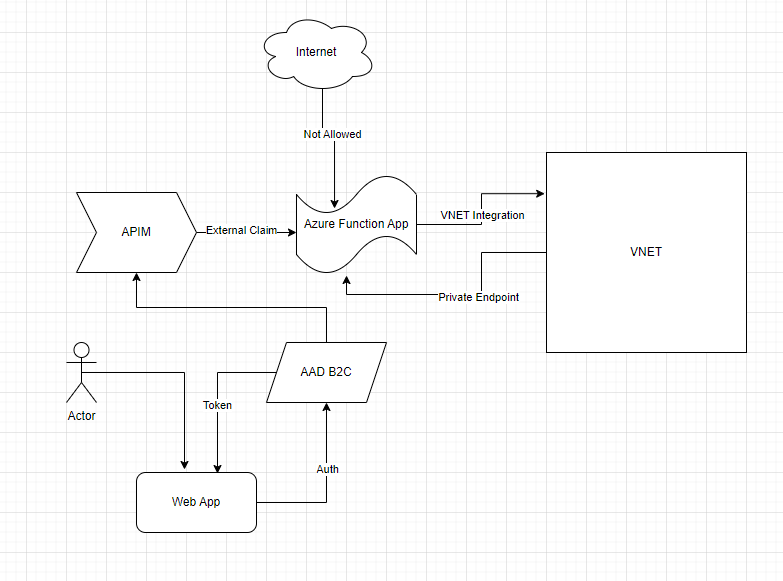
I was recently working with a customer who is using Azure AD B2C API Connector to enrich tokens with claims from external sources. They are using Azure Function App as the external source. As this setup demands, they exposed Azure Function App over public IP to work with B2C. But due to enterprise security restriction policy they must remove public endpoint from Function App and use private endpoints to VNET.
They thought of 2 options to expose the Function App securely over internet – using Azure API Management instance to a virtual network - external mode APIM in external mode or using Azure Application Gateway. But in both the cases B2C auth process errors out after adding the API Connector in the user flow:
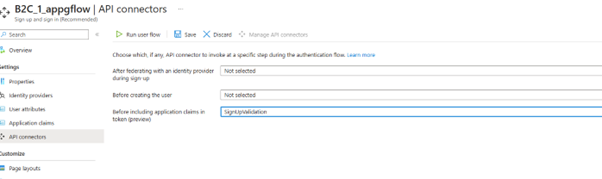
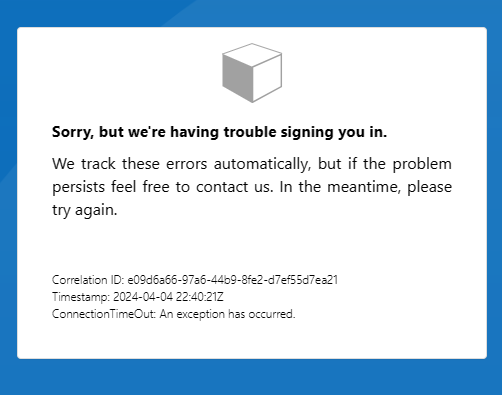
Initially I investigated on the error messages collected at the B2C, and APIM or Azure Application Gateway end. But later realized the main source of problem lies somewhere else. It is the ASP.NET Core framework used in building the Function App.
We need to modify default FowardedHeaders middleware settings. Otherwise, it will ignore the X-Forwarded headers being sent by APIM or Application Gateway because it isn’t in the list of KnownProxies and KnownNetworks. Please see the following links to understand the concept better:
- Configure ASP.NET Core to work with proxy servers and load balancers | Microsoft Learn
- Using Azure Front Door with .NET Core • Jamie Phillips (phillipsj.net)
So, I did the following changes:
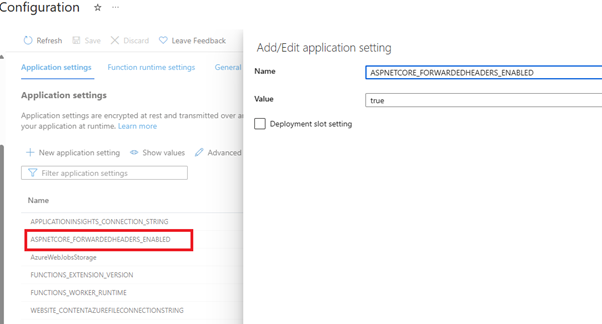
1. Added ASPNETCORE_FORWARDEDHEADERS_ENABLED application setting to my Function App Configuration:
2. Added a Startup.cs file in my function app code.
using System.Collections.Generic;
using Microsoft.AspNetCore.Builder;
using Microsoft.Azure.Functions.Extensions.DependencyInjection;
using Microsoft.Extensions.DependencyInjection;
[assembly: FunctionsStartup(typeof(TestAPIFunctionApp.Startup))]
namespace TestAPIFunctionApp
{
public class Startup : FunctionsStartup
{
public override void Configure(IFunctionsHostBuilder builder)
{
builder.Services.Configure<ForwardedHeadersOptions>(options =>
{
options.ForwardedHeaders = Microsoft.AspNetCore.HttpOverrides.ForwardedHeaders.XForwardedFor | Microsoft.AspNetCore.HttpOverrides.ForwardedHeaders.XForwardedProto | Microsoft.AspNetCore.HttpOverrides.ForwardedHeaders.XForwardedHost;
options.KnownNetworks.Clear();
options.KnownProxies.Clear();
// Put your front door, application gateway, APIM, b2clogin FQDN here and any other hosts that will send headers you want respected
options.AllowedHosts = new List<string>() { "<yourfunctionappname>.azurewebsites.net", "<yourb2cservicename>.b2clogin.com", "<yourAPIMservicename>.azure-api.net”};
});
}
}
}
That solves our problem. We can now see the “augmented claims”:

Published on:
Learn moreWe can help you with Securing Azure AD B2C API Connector (Function App) without Error
If you want help implementing, troubleshooting, or improving this product, contact us and we’ll point you in the right direction.
Related posts
End-to-End Full-Stack Web Application with Azure AD B2C Authentication: A Complete Guide
Application Overview The purpose of this sample application is to demonstrate the usage of Azure Active Directory B2C (Azure AD B2C) for authe...
Complex Data Extraction using Document Intelligence and RAG
Section 1: Introduction Historically, data extraction from unstructured documents was a manual and tedious process. It consisted of a c...
Harnessing Generative AI with Weaviate on Azure Kubernetes Service and Azure NetApp Files
Table of Contents Introduction Prerequisites Install Weaviate Approximate Nearest Neighbor (ANN) Benchmarks ANN Benchmarks Setup ANN Benchmark...
Securing Containerized Applications with SSH Tunneling
As cloud engineers and architects embrace containerization, ensuring secure communication becomes paramount. Data transmission and access cont...
Exploring AI Agent-Driven Auto Insurance Claims RAG Pipeline.
Introduction: In this post, I explore a recent experiment aimed at creating a RAG pipeline tailored for the insurance industry, specificall...
Azure NetApp Files now stores sensitive data DoD IL5 compliant in Azure US Government regions
Table of Contents Introduction Why Azure NetApp Files? DoD IL5 compliance in Azure Government Azure NetApp Files reaches feature parity betwee...
Data Intelligence End-to-End with Azure Databricks and Microsoft Fabric
This Azure Architecture Blog was written in conjunction with Isaac Gritz, Senior Solutions Architect, at Databricks. The Data Inte...
AI Studio End-to-End Baseline Reference Implementation
Azure AI Studio is designed to cater to the growing needs of developers seeking to integrate advanced AI capabilities into their appli...
Mastering AI adoption: Essentials to building, operating and optimizing genAI workloads on Azure
Mastering your AI adoption: Essentials to building, operating and optimizing genAI workloads on Azure As the demand for scalable, efficient AI...
Optimize Azure Stack HCI with the Well-Architected Framework
Azure Stack HCI is a hyperconverged infrastructure (HCI) solution that provides storage, network, and compute resources in on-premises...