
Azure Automation Hybrid Extension support for Azure VMs and Arc-enabled servers now in Preview
Businesses today are increasingly adopting hybrid and multi-cloud technologies for their infrastructure workloads. As the infrastructure footprint is growing and getting diverse, so is the need for infrastructure automation in sustaining and running operations efficiently across the environments, along with consistent management of your resources spread across environments, would likely be on top of your mind.
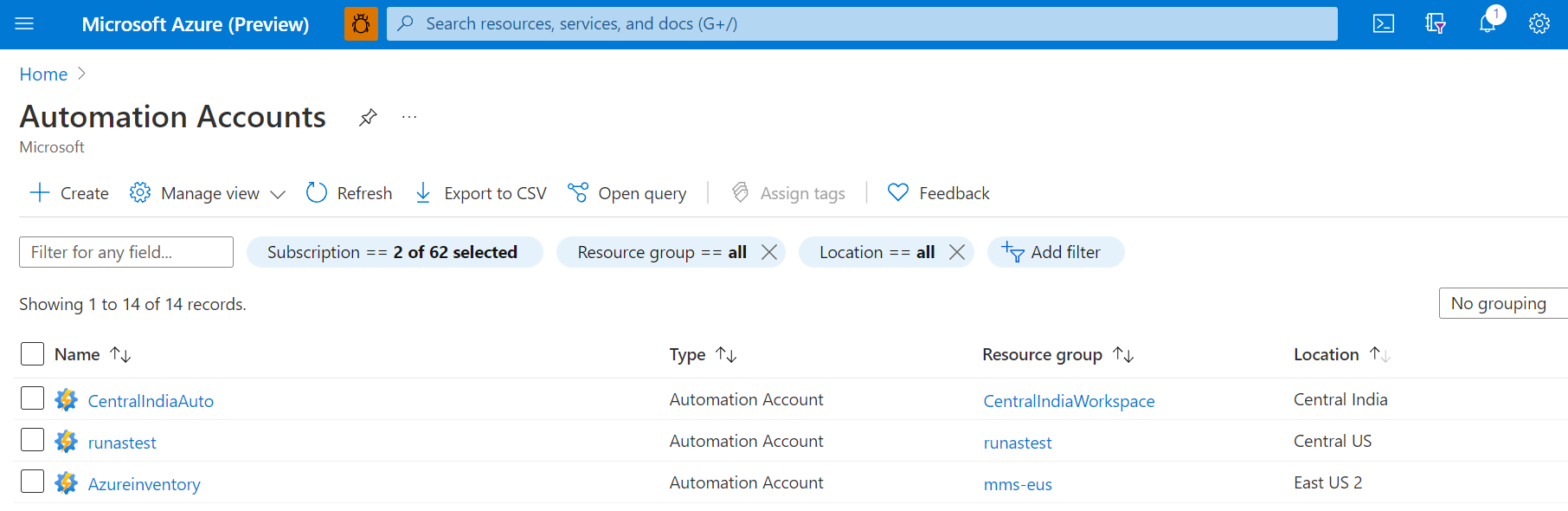
The Azure Automation service has been around since 2014 used for orchestrating & automating operations. These operations can be anything from day-to-day mundane task to a complex mission critical long running task written in PowerShell or python, two of the most common scripting languages. Automation accounts provides runbooks which are essentially scripts used to accomplish an automation task. These tasks, referred to as automation jobs, can run in the cloud or an on-premises hybrid machine.
The User Hybrid Runbook Worker feature of Azure Automation is used for executing runbooks directly on an Azure Virtual machine or non-Azure machine. From the machine that's hosting the role, you can execute runbooks directly on it to automate operations in cloud or on-premises resources.
User Hybrid runbook worker is one of the most popular tool for customers. While customers find the hybrid worker feature very useful, they want simplification of the multi-step onboarding process. This current solution leverages a Log analytics Agent-Based platform for onboarding Hybrid Workers for Azure and non-Azure machines. The need to create a Log Analytics workspace and importing the solution pack for hybrid worker often leads to invalid configuration and errors.
Today we are announcing native integration of Azure Automation User Hybrid Runbook Worker based on VM extensions for Windows and Linux Azure VMs & non-Azure machines through Arc enabled servers. We are bringing the cloud native control plane support through Azure Arc-enabled servers to non-Azure machines used for executing Hybrid automation jobs. Customers can now have a unified management experience & seamless onboarding for Automation Hybrid runbook workers across Azure and Arc-enabled servers without having a dependency on Log Analytics agent.
Other benefits of an extension-based Platform for onboarding Hybrid Runbook workers:
-
Central Management of Hybrid Runbook workers – This allows governance at scale through Azure policies, role-based access control (RBAC) across systems, enable application owners to audit & remediate apps, implement security to non-Azure machines now managed as Arc-enabled servers by providing a native integration through the resourceID of the User Hybrid Workers managed as part of the resource group.
-
Azure Active Directory based authentication – The extension-based platform leverages machine’s system assigned-identities provided by Azure Active Directory. This allows centralized control and management of identities from a single location, without having to use any local authentication mechanism. To enable organizations to meet this audit and compliance requirements of not using local authentication methods, we are providing a built-in Azure policy to disable local Authentication and use Azure AD based authentication.
-
Integrated troubleshooting tool and detailed error messages to enable customers to debug the Hybrid worker issues themselves.
Scenarios
- These new capabilities would be great for customers who want to automate non-Azure resources running on-premises, Hybrid, or multi-cloud environment by targeting automation directly on this non-Azure server or reach out to other local resources through it. Previously, the non-Azure hybrid workers were managed as a standalone resource in Azure Automation, now with an integration to Arc-enabled servers, management experience becomes consistent with how you manage a native Azure virtual machine.
- This would also be useful to customers who want to overcome the Azure Automation sandbox limitation by choosing to use an Azure Virtual machine or Arc-enabled server to run the automation on. Some common scenarios could be executing long running operations, performing resource intensive automation operations, interacting with local services running on-premise or in a hybrid environment, run scripts that require elevated permissions etc.
Getting Started
You will see a few changes in the Hybrid worker management experience in the Azure portal. In the previous agent-based platform of Hybrid Runbook Workers, there was no way of managing hybrid runbook workers and hybrid worker groups for operations like creating, deleting, adding machines to the hybrid worker group through the portal, PowerShell, or REST APIs.
In the new extension-based platform, the onboarding flow has been simplified where you can select the machines to be added to the Hybrid Runbook Worker group and the whole process of registering the machines as hybrid workers and installing the Hybrid worker to the target machine is taken care of behind the scenes.

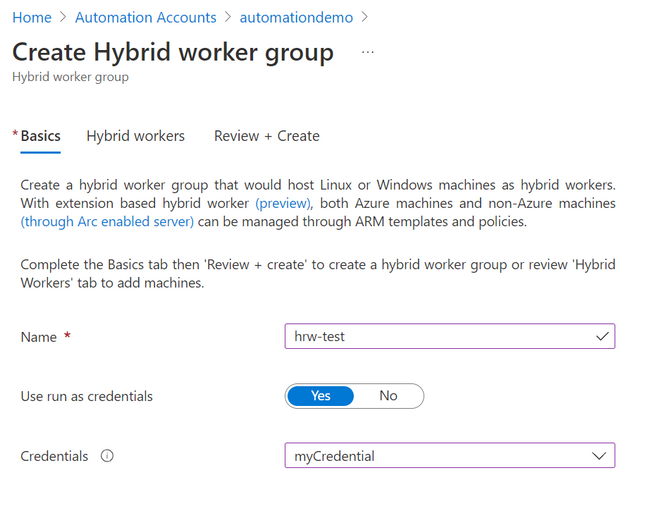
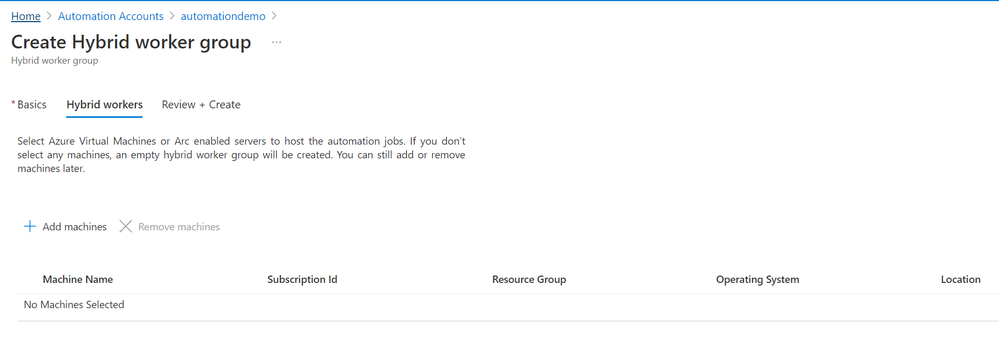
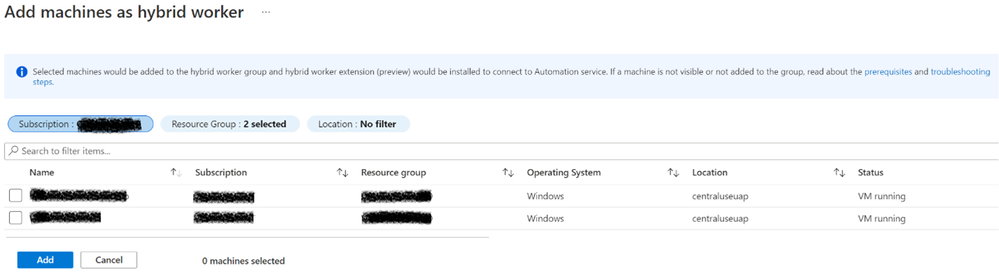
You can select Azure virtual machines or Azure Arc-enabled servers to be added to this Hybrid worker group. The Add machines option will list down all Azure Virtual Machines or Arc-enabled servers in the subscription.
Once the machine is added to the Hybrid Worker group as seen under Hybrid worker group, select Hybrid Workers. You can see the Resource Property either as an Arc-enabled server or Azure Virtual machine, and the Platform as Extension based (V2).

You can view the status of the Hybrid Worker extension from the Virtual machine extension properties – HybridWorkerExtension (For Windows and Linux).

Along with creation and adding worker to the worker group flow, the delete operation has also been provided in the portal experience. You can delete a single Hybrid runbook worker machine or multiple machines in bulk as well as delete a Hybrid worker group, if there are no machines added to it.

Roadmap
We will continue to invest more efforts in the coming months around Hybrid worker extension, making it the default recommended way of onboarding Hybrid workers in Azure Automation. We are coming up with a native migration path for customers to seamlessly move from Agent-based platform to the new Extension-based platform for Hybrid worker extension.
Learn more about Automation Hybrid Runbook Worker overview
Learn more about Deploying an extension-based Windows or Linux User Hybrid Runbook Worker in Automation
Additional Resources
- New to Azure Automation? Sign up for an Azure trial subscription.
- You can find all the Azure Automation updates in the Azure Update Blogs
- If you have any questions or suggestions on Automation Hybrid Extension, reach out to Azure Automation Q&A forum.
Published on:
Learn moreRelated posts
Azure Landing Zones - Policy Refresh Q1 FY25
ALZ - Policy Refresh Q1 FY25 is here! As you may be aware, the ALZ team release cadence is now on quarterly basis to help customers and partne...
Custom Policy- Reusable Logs Templates
Reusable Templates for Sending Logs to Log Analytics Workspace Challenge: When it comes to developing custom policies for sendin...
Enhancements to Azure Monitor Baseline Alerts for Azure Landing Zones
Introduction Welcome to our latest blog post where we dive into a number of exciting new key updates, highlight the new portal accelera...
Introducing the Azure Policy Community Repo
Introducing the Azure Policy Community Repo What is the Azure Policy Community Repo? The Azure Policy Community Repo is a collaborativ...
General Availability: Vaulted backups for Azure Blob Storage
We are excited to announce the general availability of vaulted backups for Azure Blob Storage. Vaulted backups can help you achieve complete p...
Azure Update Manager to support CIS hardened images among other images
What’s coming in by end of July 2024: Azure Update Manager will add support for 35 CIS hardened images. This is the first time that Update Man...
Mastering your cloud journey: Essentials to Innovating, Migrating and Modernizing, on Azure
We are living during a time of rapid growth in AI technologies and seeing cloud complexity increase as a result of those advanced workloads, w...
Public Preview Announcement: Azure Policy Built-in Versioning
Welcome to a new era of policy management, where policy definitions are more agile, adaptable, and accessible than ever before! We are thrille...
Announcing Azure Monitoring Agent support in Azure Landing Zones
Introduction Hello and welcome to another blog post about Azure Landing Zones, the best practice framework for accelerating your cloud...
Announcing the General Availability of Change Actor
Change Analysis Identifying who made a change to your Azure resources and how the change was made just became easier! With Change Analys...