
Share your feedback on Microsoft 365 Defender via the new feedback portal

Microsoft is constantly looking for ways to improve its products and services, and listening to the voices of our customers is a crucial part of that process. We heard from our customers that they would appreciate an open and collaborative platform where they can provide feedback and help influence the direction of Microsoft products, and at the same time have a way to interact and have their voices heard by our product teams.
We’re excited to announce that Microsoft 365 Defender is now part of the new community feedback experience, and our customers now have a dedicated platform to submit their suggestions and feature requests for our security products.
The new Feeback portal is available to all Microsoft 365 Defender customers, serving as a central place for you to share insights about any aspect of the product and recommend new product features.
We invite you to explore the new Feedback portal at https://aka.ms/M365Defender/Feedback.

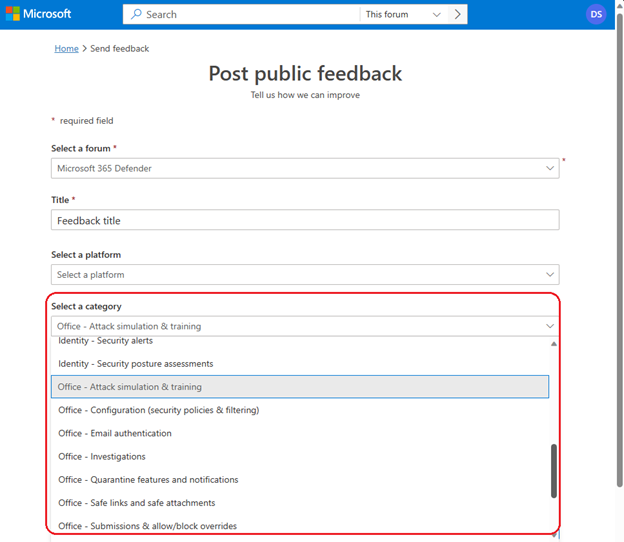
When submitting a new feedback, make sure to select the appropriate security product under “select a category” in the Microsoft 365 Defender forum:
|
Product |
Category |
Subcategories |
|
Cloud Apps |
Application governance, Discovery, Information protection, Real time controls, Threat protection |
|
|
Endpoint |
Antimalware, Configuration |
|
|
Identity |
Configuration/Deployment, Health alerts, Security alerts, Security posture assessments |
|
|
Office |
Attach simulation & training, Configuration (security policies & filtering), Email authentication, Investigations, Quarantine features and notifications, Safe links and safe attachments, Submissions & allow/block overrides, Threat explorer |
|
|
Portal |
Advanced hunting, Alerts and incidents, Integrations, Security posture |
For example, if you want to provide feedback on Microsoft Defender for Office 365, please make sure to select the “Select a category” and scroll down to the options that start with “Office –"
Search, Vote and Track
The new feedback portal offers customers a range of features designed to improve customer participation. One of the key benefits is the ability for customers to search and vote on features they consider important. This capability allows Microsoft product teams to gain valuable insights into the most sought-after features and prioritize their product development accordingly, ensuring that customer needs remain at the forefront of our innovation efforts.
Furthermore, customers can leave comments, provide additional context or suggestions, and easily monitor and stay updated on the progression of their favorite suggestions by simply clicking on the “follow” button. You have the option to receive email notifications when there is a new activity related to your feedback. To do that, make sure to turn on notifications setting after submitting feedback.
Upon submission, your feedback is sent to the relevant product teams for review. We look for similar feedback from other users and group it together to identify the most impactful ones. Please note that due to the volume of feedback received, we cannot guarantee an individual reply to everyone. Nevertheless, we are committed to providing updates on your feedback to the best of our ability.
Learn more
- Check our documentation to get started today
- Go to our website to learn more about Microsoft 365 Defender
Published on:
Learn moreRelated posts
Monthly news - November 2024
Microsoft Defender XDRMonthly newsNovember 2024 Edition This is our monthly "What's new" blog post, summarizing product updates and v...
Monthly news - August 2024
Microsoft Defender XDRMonthly newsAugust 2024 Edition This is our monthly "What's new" blog post, summarizing product updates and var...
Defender for Identity: the critical role of identities in automatic attack disruption
In today's digital landscape, cyber-threats are becoming increasingly sophisticated and frequent. Advanced attacks are often multi-workload an...
New Security Copilot skill: Identity Summary
“Can you summarize Defender insights about this user over the last two days?” Microsoft’s latest innovation for Copilot for Security, sim...
Demystify potential data leaks with Insider Risk Management insights in Defender XDR
In today's complex security landscape, understanding and mitigating data exfiltration risks is more critical than ever. Earlier this year, we ...
Monthly news - October 2024
Microsoft Defender XDRMonthly newsOctober 2024 Edition This is our monthly "What's new" blog post, summarizing product updates and va...
AI-Driven Guided Response for SOCs with Microsoft Copilot for Security
In today's evolving cybersecurity landscape, security operation centers (SOCs) are constantly bombarded with incidents ranging from minor aler...
Identity Summary: New Security Copilot skill within Defender XDR
“Can you summarize Defender insights about this user over the last two days?” Microsoft’s latest innovation for Copilot for Security, sim...
Detecting browser anomalies to disrupt attacks early
Detecting browser anomalies is crucial for early identification and prevention of cyber threats, preventing data breaches and attacks by monit...
Microsoft Defender for Identity: the critical role of identities in automatic attack disruption
In today's digital landscape, cyber-threats are becoming increasingly sophisticated and frequent. Advanced attacks are often multi-workload an...