
Now in Preview – Spot priority mix for Azure Virtual Machine Scale Sets

Today we are announcing the preview of Spot priority mix for Azure Virtual Machine Scale Sets (VMSS) with flexible orchestration. This new capability allows you to create and expand a VM (virtual machine) scale set containing both Spot VMs and standard VMs. You will now have the flexibility to run a mix of standard and Spot VMs for VMSS deployments, and easily achieve a balance between availability and lower infrastructure costs based on your workload requirements.
With this new capability, you can now specify the minimum number of standard VMs you would like to run in a scale set in addition to specifying the % split between Spot and standard VMs that must be maintained when scaling above the minimum standard VM count. If Spot VM capacity becomes unavailable, then you can specify whether the scale-out operation should create standard VMs not to impact overall availability and performance during periods of high demand.
The ability to mix Spot and standard VMs gives you additional VMSS management capabilities to:
- Reduce compute infrastructure costs by leveraging the deep discounts that Spot VMs can provide while maintaining the compute capacity your workload needs.
- Simplify the scale out and scale in operations of compute workloads that require both Spot and standard VMs by letting Azure orchestrate the creation or deletion of the appropriate mix of VM types.
Spot priority mix can be useful in a variety of scenarios. Here’s a couple of examples:
- Run time bound financial risk management and modeling workloads without compromising on the baseline performance but delivering faster results and cost savings by adding Spot VMs.
- Run web-services and load-balancing workloads for an e-commerce site at scale by mixing Spot and standard VMs of the same VM type and size to maximize your workload efficiency and resiliency.
How to set up Spot priority mix using ARM REST API
To create a VM Scale Set with a mix of standard and Spot VMs, simply add the following properties to the scale set with flexible orchestration mode using a virtual machine profile:
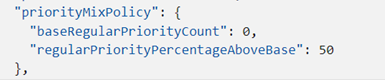
New Parameters:
- baseRegularPriorityCount – specifies a base number of standard VMs; if the scale set capacity is at or below this number, all VMs will be standard VMs.
- regularPriorityPercentageAboveBase – specifies the percentage split of standard and Spot VMs that will be used when the scale set capacity is above the baseRegularPriorityCount.
Try out Spot priority mix:
The Azure portal helps you to locate Virtual Machine Scale Set as one of the Azure services. You can then select the orchestration mode as “flexible” and choose the “Run with Azure Spot discount” option:

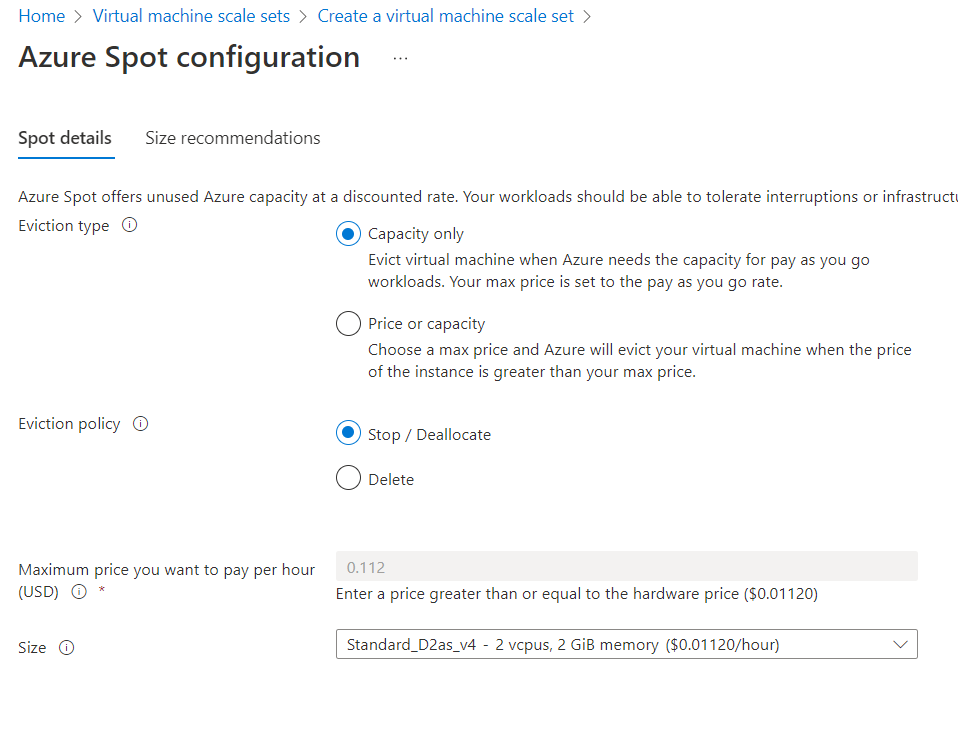
Configure your Spot VM using “Azure Spot configuration” by setting the eviction type, policy, and selecting the VM size.
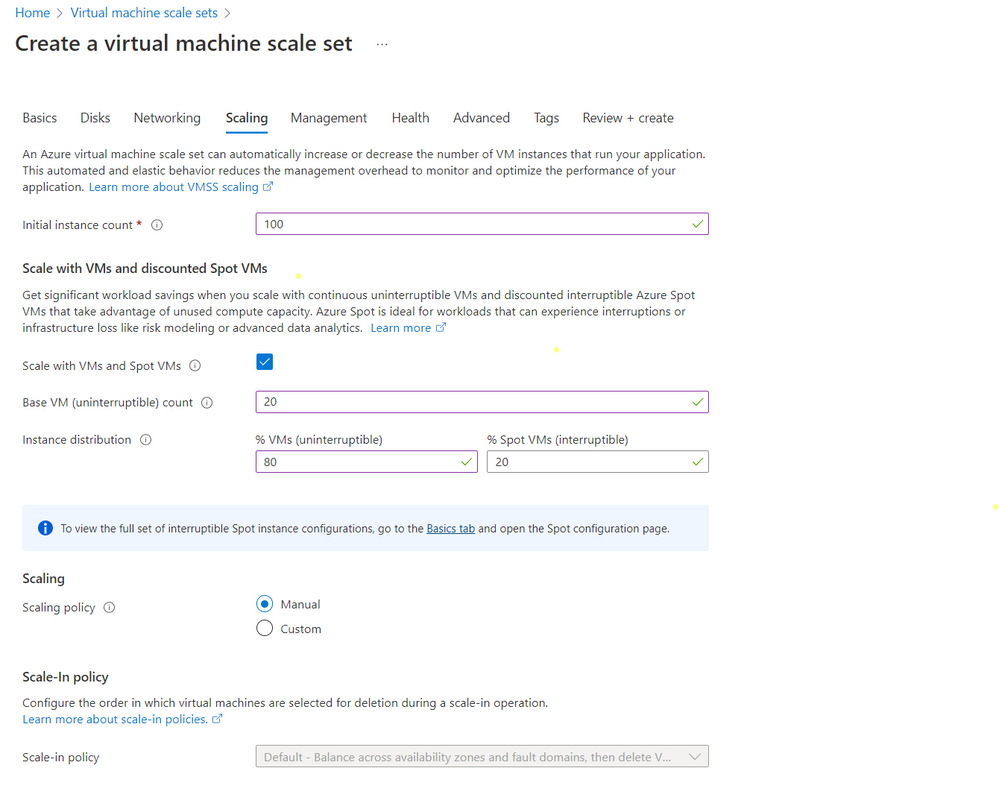
Move on to “Scaling” tab to specify your initial instance count, select “Scale with VMs and discounted Spot VMs” and proceed to specify your base VM and percentage distribution of standard (on-demand) and Spot VMs
Available now:
Spot priority Mix is available now in preview with Azure Virtual Machine Scale Sets flexible orchestration mode in all Azure regions except China.
Learn more by reading the documentation.
Published on:
Learn moreRelated posts
Upcoming Changes to Instance Size Flexibility Ratios for Reserved VM Instances for M-series: What Yo
Overview In the ever-evolving landscape of cloud computing, it is crucial to stay informed about changes that may affect your usage and busine...
Exploring SUSE Enterprise Linux on Azure
Exploring SUSE Enterprise Linux on Azure In today's cloud-centric world, leveraging robust and reliable operating systems is crucial for busin...
Announcing Public Preview of new attach/detach disks API for VMs/VMSS
We are excited to announce the public preview of a new API that will make attaching and detaching disks to a VM faster and easier. The new API...
Fine-tuning a Hugging Face Diffusion Model on CycleCloud Workspace for Slurm
Introduction Azure CycleCloud Workspace for Slurm (CCWS) is a new Infrastructure as a Service (IaaS) solution which allows the users to purpos...
Public Preview Announcement-On Demand Capacity Reservation in Azure in China
Today, we're announcing the public preview of on demand capacity reservations for Azure Virtual Machines in Azure in China Cloud . Y...
Breaking change for Window Server 2022 Image Users with .NET 6
Azure Marketplace media images for Windows Server 2022 currently include .NET 6, but going forward will not include a .NET version with the im...
Announcing the public preview of the new Azure FXv2-series Virtual Machines
Today, Microsoft is announcing the public preview of the new Azure FXv2-series Virtual Machines (VMs), based on the 5th Generation Intel® Xeon...
Effortlessly Migrate Azure VMs between zones
For various reasons you might come across a situation when you need to migrate your Azure VMs from one zone to another. Migrating Azure VMs be...
Announcing Public Preview of Instance Mix on Virtual Machine Scale Sets
Today, we’re excited to announce that the ability to specify multiple different VM sizes in your Virtual Machine Scale Sets (VMSS) with Flexib...
Announcing General Availability of Attach & Detach of Virtual Machines on Virtual Machine Scale Sets
Today, we’re thrilled to announce that the ability to attach or detach Virtual Machines (VMs) to and from a Virtual Machine Scale Set (VMSS) w...