
Leverage Azure API Management to distribute API traffic to multiple backend services

This is a summarized edition of the following original articles, both of which were published in Japanese. This is a memo as of 27 January 2024.
Azure API Managementのバックエンドプール – Logico Inside (logico-jp.io)
Azure API Managementのバックエンドでサーキットブレーカーを構成する – Logico Inside (logico-jp.io)
Circuit breaker and load balanced pool features have recently been added to the API Management backend. Both are in public preview as of 27 January 2024.
Azure API Management backends | Microsoft Learn
In public preview, we must use either Bicep, ARM, or REST APIs (2023-05-01-preview or later) to configure circuit breakers and load-balanced pools. There is no command for either CLI or PowerShell and there is no dedicated configuration page in Azure Portal.
Backend - REST API (Azure API Management) | Microsoft Learn
Load-balanced pool
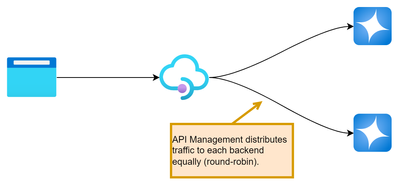
Previously a backend could only contain one endpoint of a backend service. If we need to distribute traffic to multiple backend services, we need to provision and deploy an L4/L7 load balancer in front of the backend services. Load-balanced pool allows us to distribute request traffic to multiple backend services without managed/unmanaged load balancer. This feature has already been included in other API gateway products, but finally this comes to Azure API Management.
Limitation
There are some limitations as of 27 January 2024.
- Round-robin is the only load balancing option. (We hope that other load balancing methods will be implemented in GA.)
- As mentioned in the documentation, an API Management instance with Developer and Premium SKUs deployed in an internal virtual network may throw HTTP 500
BackendConnectionFailureerrors when the gateway endpoint URL and backend URL are the same. Please refer to the following URL for more details.
Azure API Management backends | Microsoft Learn - Nested load-balanced pools are not supported.
Circuit breaker
Another feature, circuit breaker, is a common pattern for preventing an application from repeatedly trying to perform an operation that’s likely to fail. Previously we had to implement a circuit breaker in backend service(s) by ourselves, but we don’t have to implement this feature.
Circuit Breaker pattern - Azure Architecture Center | Microsoft Learn
Limitation
Some limitations are found as of January 27, 2024.
- Backend circuit breaker is not supported in the API Management Consumption SKU.
- “Half-open” state of circuit breaker is not supported.
Please refer to “NOTE” in the document for more details.
Azure API Management backends | Microsoft Learn
Configuration
Preparation
The following endpoints will be used for the backend.
<URL1>/api/test<URL2>/api/test
For the API frontend, we use the following configuration.
<APIM's URL>/suffix/foo
In this case, requests will normally be routed to the following URL, unless no change is made to the routing endpoint in inbound section.
<URL1 or URL2>/api/test/foo
Circuit breakers
To configure a circuit breaker for backend, the following JSON is published via REST API. Needless to say, we can configure the circuit breaker with ARM and Bicep.
Regarding properties.circuitBreaker.rules.failureCondition.interval and properties.circuitBreaker.rules.tripDuration, both should follow ISO8601 duration specification. In case of the example above, interval (duration to collect the number of errors) is 5 minutes, and tripDuration (duration during which circuit breaker is tripped) is 10 minutes.
A same configuration should be made for test2.
Load-balanced pool
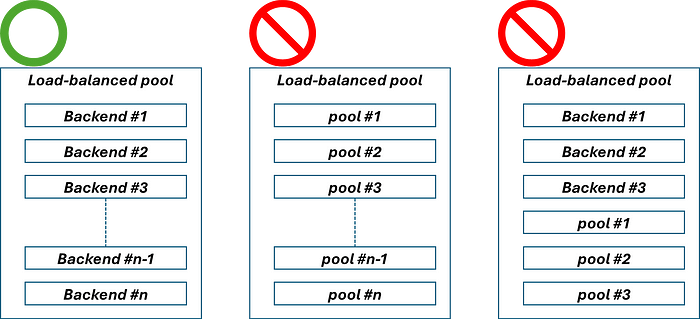
We will use the two backends configured in the last section to configure the load-balanced pool. Although, properties.url is mandatory, specified URL is meaningless. In this case, it is okay to specify http://localhost to properties.url. Also note that Pool should be specified in properties.type, instead of Single. The following JSON is then posted via REST API. As I mentioned in the last section, we can also use ARM and Bicep.
That’s it. Now it is time to test.
Let’s try it.
In this example, the backend test2 always returns HTTP 503 (Service Unavailable). I called the API every 5 seconds to observe behaviours using the APIM request tracing feature.
Tutorial - Debug APIs in Azure API Management using request tracing | Microsoft Learn
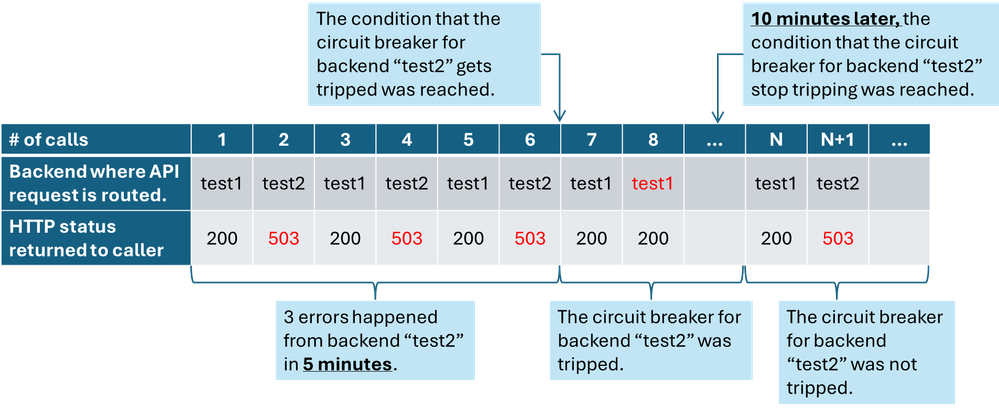
After 6 API calls, the circuit breaker is tripped since test2 returns HTTP 503 (Service Unavailable) error 3 times.
At the 7th or 8th call, the API request would normally be routed to the backend test2 in the load-balanced pool, but the request is only routed to the backend test1 because APIM detects that the circuit breaker of the backend test2 is tripped. 10 minutes later, the circuit breaker stops tripping, and the normal state is resumed; the load-balanced pool is distributing API requests to the one of backends in the pool.
How about using these features with retry policy?
If we use a load-balanced pool and a circuit breaker with retry policy in backend section, we can configure the routing of API requests in a more sophisticated way. As I wrote in the following entry, we can configure fallback more easily, similar to configuring with L7 load balancer.
If we use both features introduced to backends with retry policy, all we need to do is slightly modify the original policy configuration in the URL above, which is for request distribution to one of the Azure OpenAI Service instances, to use load-balanced pool and specify it as a backend service. Here is the example of policy configuration.
This policy configuration meets the requirements shown below.
Conclusion
Previously backends did not have load balancing or circuit breaker functionality, but now both of them have been added to Azure API Management. We hope that both will reach GA soon and we will be able to route API requests to backends in a more sophisticated way.
Published on:
Learn moreWe can help you with Leverage Azure API Management to distribute API traffic to multiple backend services
If you want help implementing, troubleshooting, or improving this product, contact us and we’ll point you in the right direction.
Related posts
End-to-End Full-Stack Web Application with Azure AD B2C Authentication: A Complete Guide
Application Overview The purpose of this sample application is to demonstrate the usage of Azure Active Directory B2C (Azure AD B2C) for authe...
Complex Data Extraction using Document Intelligence and RAG
Section 1: Introduction Historically, data extraction from unstructured documents was a manual and tedious process. It consisted of a c...
Harnessing Generative AI with Weaviate on Azure Kubernetes Service and Azure NetApp Files
Table of Contents Introduction Prerequisites Install Weaviate Approximate Nearest Neighbor (ANN) Benchmarks ANN Benchmarks Setup ANN Benchmark...
Securing Containerized Applications with SSH Tunneling
As cloud engineers and architects embrace containerization, ensuring secure communication becomes paramount. Data transmission and access cont...
Exploring AI Agent-Driven Auto Insurance Claims RAG Pipeline.
Introduction: In this post, I explore a recent experiment aimed at creating a RAG pipeline tailored for the insurance industry, specificall...
Azure NetApp Files now stores sensitive data DoD IL5 compliant in Azure US Government regions
Table of Contents Introduction Why Azure NetApp Files? DoD IL5 compliance in Azure Government Azure NetApp Files reaches feature parity betwee...
Data Intelligence End-to-End with Azure Databricks and Microsoft Fabric
This Azure Architecture Blog was written in conjunction with Isaac Gritz, Senior Solutions Architect, at Databricks. The Data Inte...
AI Studio End-to-End Baseline Reference Implementation
Azure AI Studio is designed to cater to the growing needs of developers seeking to integrate advanced AI capabilities into their appli...
Mastering AI adoption: Essentials to building, operating and optimizing genAI workloads on Azure
Mastering your AI adoption: Essentials to building, operating and optimizing genAI workloads on Azure As the demand for scalable, efficient AI...
Optimize Azure Stack HCI with the Well-Architected Framework
Azure Stack HCI is a hyperconverged infrastructure (HCI) solution that provides storage, network, and compute resources in on-premises...