
Multi-Region Active-Active Configurations for Azure Blob Storage

In today’s post, I’m excited to shed light on a creative solution I devised to meet a unique client requirement. Azure Blob storage, in its native form, doesn’t inherently support multi-region active-active architectures. However, as every cloud architect knows, challenges often pave the way for innovative solutions.
My client was on the hunt for a method to achieve a multi-region active-active configuration with Azure blob storage. Rising to the occasion, I devised two potential designs, presenting both to the client. After a thorough discussion, the client chose the design that fit their needs seamlessly. I believe sharing these designs might prove beneficial for others faced with a similar challenge.
At the heart of this solution, the client’s application is exposed to its users through Azure Traffic Manager. Traffic manager efficiently routes traffic to Virtual Machines (VMs) located in two separate regions. These VMs, operating behind a load balancer, interact with the Azure blob storage, writing data from both regions. For bolstered security against unforeseen calamities, it’s imperative that the Azure storage account is set to be Geo-redundant. This ensures that in case of disasters, it can be failed over to the secondary region, ensuring accessibility with little to no interruption.
Accessing Storage via Service Endpoint
In this model, Blob storage can be reached from both regions using the Service Endpoint. To counteract potential data exfiltration, Service Endpoint Policies are put into place.
 Accessing Storage via Service Endpoint
Accessing Storage via Private Endpoint
The alternate model has Blob storage accessed via a private endpoint from both regions. Given that this model integrates the Azure service into the VNET, Private endpoint options is always a top pick for most of our customers.
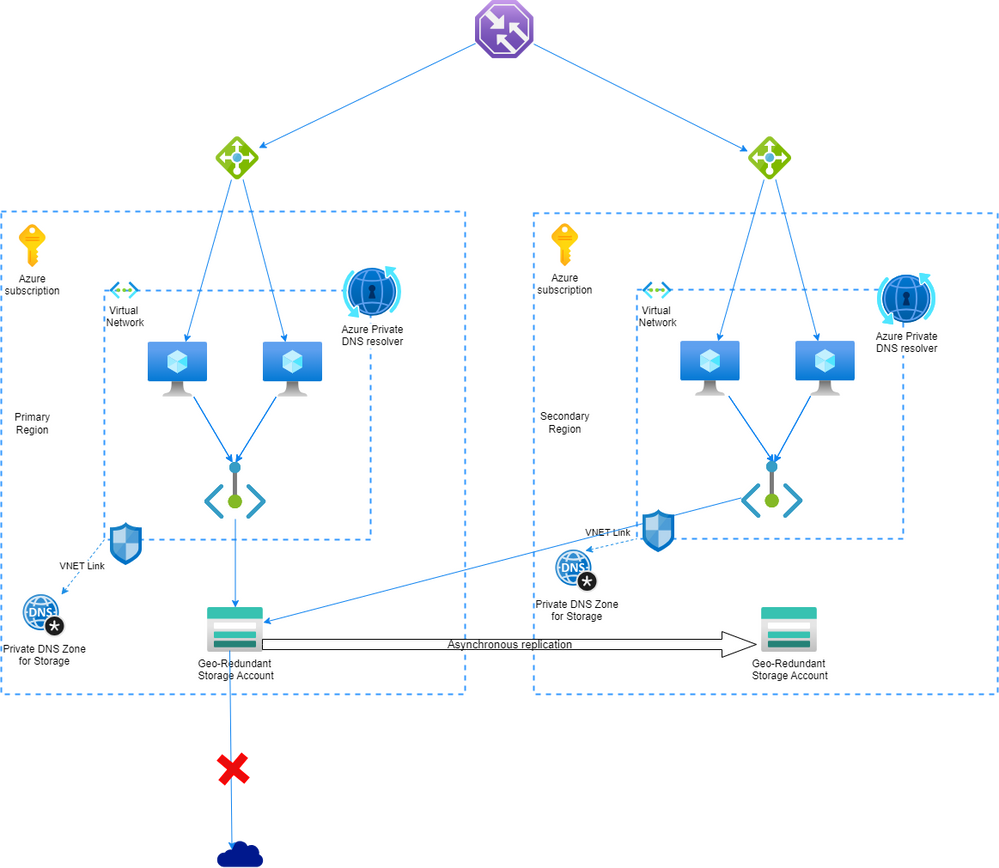
Both these designs boast robustness at every layer. With two VMs set up in each region, the system ensures that even if one VM faces issues, the service remains undisturbed. Should both VMs in a single region falter, the other region swiftly steps in to guarantee continued service. Thanks to the Geo-redundant nature of the storage, even in the face of major disruptions, the storage account can switch from the primary to the secondary region. This transition refreshes the DNS entry for the storage account, transforming the secondary endpoint into the primary.
I hope this deep dive into my design solutions offers insights for fellow cloud architects and enthusiasts alike. As the world of cloud computing continually evolves, so does our quest for pioneering solutions.
Published on:
Learn moreWe can help you with Multi-Region Active-Active Configurations for Azure Blob Storage
If you want help implementing, troubleshooting, or improving this product, contact us and we’ll point you in the right direction.
Related posts
Update on classic storage account retirement and upcoming changes for classic storage customers
We previously announced that support would end for retired Azure classic storage accounts on 31 August 2024. Now that we are past the retireme...
Azure Elastic SAN for Azure VMware Solution: now Generally Available
Have you been looking to expand your storage on Azure VMware Solution (AVS), but do not need the extra compute performance and the associated ...
Accelerate metadata heavy workloads with Metadata Caching preview for Azure Premium Files SMB & REST
Azure Files previously announced the limited preview of Metadata caching highlighting improvements on the metadata latency (up to 55...
Announcing UNLIMITED Public Preview of Metadata Caching for Azure Premium SMB/REST File Shares
Azure Files is excited to announce the Unlimited public preview of Metadata Caching for the premium SMB/REST file share tier. Unlimited ...
Azure Backup-SAP HANA DB Backup Delivers More Value at Lower TCO with Reduced Protected Instance Fee
Azure Backup for SAP HANA Database Delivers More Value at Lower TCO with Reduced Protected Instance Fees starting 1st Sept’2024 At Azur...
Switch to Azure Business Continuity Center for your at scale BCDR management needs
In response to the evolving customer requirements and environments since COVID-19, including the shift towards hybrid work models and the incr...
The Azure Storage product group is heading to the SNIA Developer Conference 2024
The Azure Storage product group is heading to the SNIA Developer Conference (SDC) 2024 in Santa Clara, California, USA from September 16th thr...
Latest advancements in Premium SSD v2 and Ultra Azure Managed Disks
We are excited to share the latest advancements in Premium SSD v2 (Pv2) and Ultra disks, the next generation of Azure disk stor...
Unlocking the Potential of Unstructured Data with Microsoft Copilot and Azure Native Qumulo
It has been a true pleasure to see our friends at Qumulo constantly innovating and delivering a service that adds more value with every releas...
Public Preview: Customer Managed Planned Failover for Azure Storage
We are excited to announce customer managed Planned Failover for Azure Storage is now available in public preview. Over the past few ye...