
Announcing the Public Preview of Metadata Caching for Azure Premium SMB File Shares
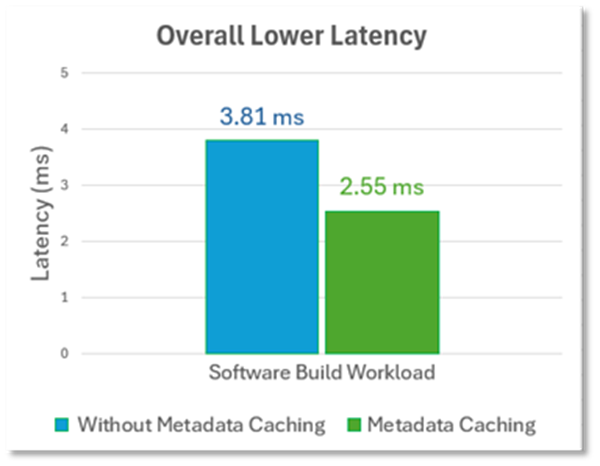
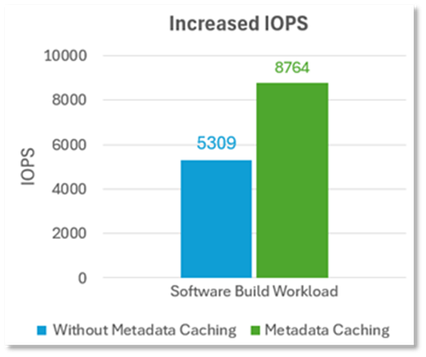
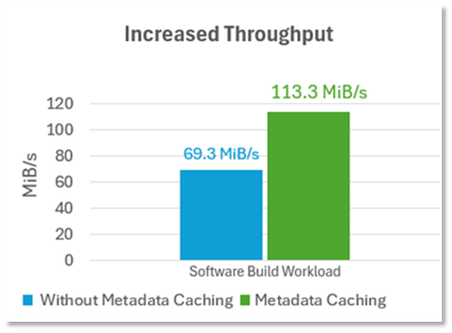
Azure Files is excited to announce the public preview of Metadata Caching for the premium SMB file share tier. Metadata Caching is an enhancement aimed at reducing metadata latency for file workloads running on Windows/Linux clients. In addition to lowering metadata latency, workloads will observe a consistent latency experience which will allow metadata intensive workloads to be more predictable and deterministic. Reduced metadata latency also translates to more data IOPS (reads/writes) and throughput.
Once Metadata Caching is enabled, there is no additional cost or operational management overhead when using this feature.
The following Metadata APIs will benefit from Metadata Caching.
- Create: Creating a new file; Up to 30% Faster
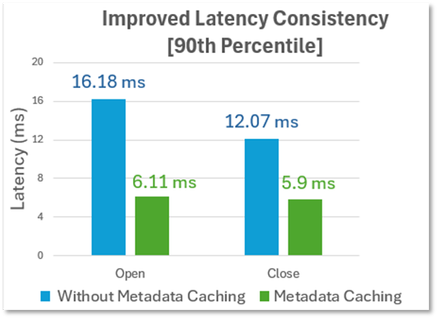
- Open: Opening a file; Up to 55% Faster
- Close: Closing a file; Up to 45% Faster
- Delete: Deleting a file; Up to 25% Faster
Workloads that perform a high volume of metadata operations (creating/opening/closing/deleting) against a SMB Premium File share will receive the biggest benefit compared to workloads that are primarily data IO (e.g. databases)
Example of metadata heavy workloads include:
- Web\App Services: Frequently accessed files for CMS\LMS services such as Moodle\WordPress.
- Indexing\Batch Jobs: Large scale processing using Azure Kubernetes or Azure Batch.
- Virtual Desktop Infrastructure: Azure Virtual Desktop\Citrix users with home directories or VDI applications with general purpose file system needs.
- Business Application: Custom line of business or legacy application with “Lift and shift” needs.
- CI\CD - DevOps Pipeline: Building, testing, and deployment workloads such as Jenkins open-source automation.
Expected Performance Improvement with Metadata Cache.
- 2-3x Improved Metadata Latency Consistency
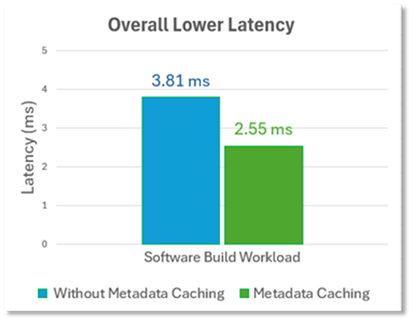
- Improved Metadata Latency beyond 30%
- Increased IOPS and Bandwidth up to 60%
 |
 |
|
 |
How to get started
To begin onboarding to the Public Preview, please sign up on https://aka.ms/PremiumFilesMetadataCachingPreview and additional details will be provided.
Regions Supported
- Australia East
- Brazil Southeast
- France South
- Germany West Central
- Switzerland North
- UAE North
- UAE Central
- US West Central
(Updates will be provided as additional regions are supported and please sign up above to help influence the region prioritization)
Who should Participate?
Whether it is a new workload looking to leverage file shares or existing ones looking for improvements. Any workloads/usage patterns that contains metadata should be encouraged to onboard, specifically metadata heavy workloads that consist primarily of Create/Open/Close or Delete requests.
To determine if your workload contains metadata, can use Azure Monitor to split the transactions by API dimension as described in the following article
Thanks
Azure Files Team
Published on:
Learn moreWe can help you with Announcing the Public Preview of Metadata Caching for Azure Premium SMB File Shares
If you want help implementing, troubleshooting, or improving this product, contact us and we’ll point you in the right direction.
Related posts
Update on classic storage account retirement and upcoming changes for classic storage customers
We previously announced that support would end for retired Azure classic storage accounts on 31 August 2024. Now that we are past the retireme...
Azure Elastic SAN for Azure VMware Solution: now Generally Available
Have you been looking to expand your storage on Azure VMware Solution (AVS), but do not need the extra compute performance and the associated ...
Accelerate metadata heavy workloads with Metadata Caching preview for Azure Premium Files SMB & REST
Azure Files previously announced the limited preview of Metadata caching highlighting improvements on the metadata latency (up to 55...
Announcing UNLIMITED Public Preview of Metadata Caching for Azure Premium SMB/REST File Shares
Azure Files is excited to announce the Unlimited public preview of Metadata Caching for the premium SMB/REST file share tier. Unlimited ...
Azure Backup-SAP HANA DB Backup Delivers More Value at Lower TCO with Reduced Protected Instance Fee
Azure Backup for SAP HANA Database Delivers More Value at Lower TCO with Reduced Protected Instance Fees starting 1st Sept’2024 At Azur...
Switch to Azure Business Continuity Center for your at scale BCDR management needs
In response to the evolving customer requirements and environments since COVID-19, including the shift towards hybrid work models and the incr...
The Azure Storage product group is heading to the SNIA Developer Conference 2024
The Azure Storage product group is heading to the SNIA Developer Conference (SDC) 2024 in Santa Clara, California, USA from September 16th thr...
Latest advancements in Premium SSD v2 and Ultra Azure Managed Disks
We are excited to share the latest advancements in Premium SSD v2 (Pv2) and Ultra disks, the next generation of Azure disk stor...
Unlocking the Potential of Unstructured Data with Microsoft Copilot and Azure Native Qumulo
It has been a true pleasure to see our friends at Qumulo constantly innovating and delivering a service that adds more value with every releas...
Public Preview: Customer Managed Planned Failover for Azure Storage
We are excited to announce customer managed Planned Failover for Azure Storage is now available in public preview. Over the past few ye...