
Adaptive Card-based Loop components – Now in developer preview!

Adaptive Card-based Loop components are live and actionable units of productivity that stay in sync and can move freely across Microsoft 365 apps, starting with Microsoft Teams and Outlook. At Build ‘22, we announced a private preview for developers to create Adaptive Card-based Loop components, and since then we have partnered with organizations such as SAP, Zoho and Priority Matrix to build experiences that will allow their users to bring live business data into chats and emails. Previously, we shared with you the variety of scenarios that our partners have been working on.
We’re excited to announce that Adaptive Card-based Loop components are now available in public preview! In this article, we want to give you a sneak peek into how you can build your own first set of live, actionable, portable Adaptive Card-based Loop components to bring your business content directly into Teams, Outlook, and other Microsoft 365 apps.
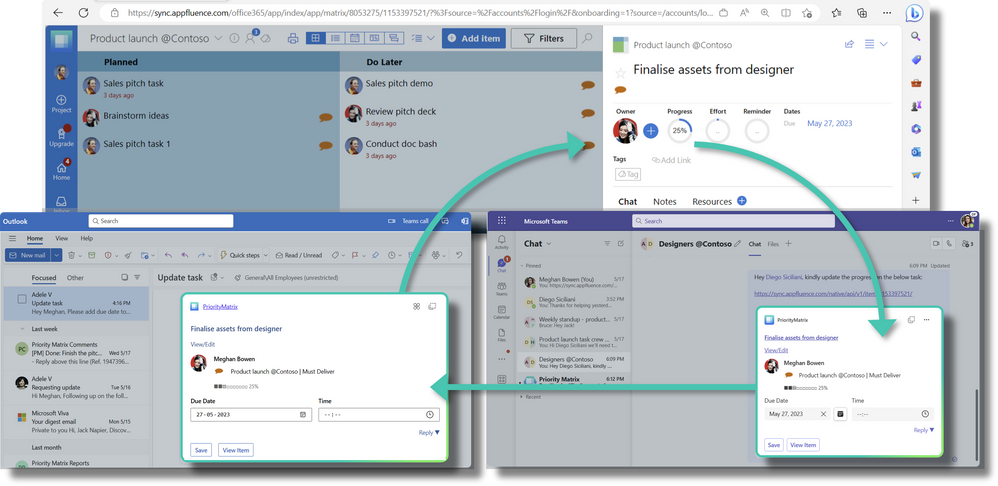
How partners can develop Adaptive Cards-based Loop Components
There are three distinct stages in your journey to building Adaptive Card-based Loop components –
- The pre-requisites
- The magic ingredient
- The experience
Stage 1: The pre-requisites
- The first step is to identify the relevant use cases or flows where user productivity can be improved and build a Search-based message extension to support these scenarios.
- Next, you need to add the link unfurling capability to your app. With this, your app can embed relevant information into chats and emails through copy-paste of your links.
- Next, you need to extend the message extension to Microsoft 365 to ensure that your scenarios work across all supported M365 apps. Also, make sure that your Adaptive Card actions work across Teams and Outlook.
Overall, if you already have a message extension app, then enabling Adaptive Card-based Loop component is a very quick process. ServiceDesk Plus - an IT Service Management solution by the Zoho Corp., is leveraging the power of Adaptive Card-based Loop components to optimize its incident and ticket management use cases. In the words of Jagadeesh Goddumuri, a Product Manager driving M365 integrations at Zoho., “Through adopting Adaptive Card-based Loop components we expect to reduce context switching for our users across multiple applications, hence improving the incident response time and in turn making our customers’ businesses more efficient. For the developers this implies a huge ROI with minimal effort, along with a significant improvement in CSAT. Finally, we are a step closer in seamlessly connecting and tightly integrating our product with Microsoft platforms, enhancing the user experience, and maximizing the potential of our solution”.
Stage 2: The special ingredient
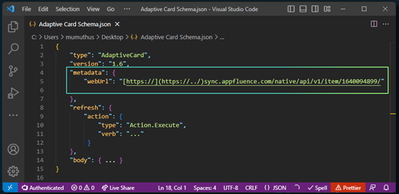
Once you have taken care of the pre-requisites, the next step is to add the special ingredient which makes Adaptive Card-based Loop components live and portable. You need to include the URL that uniquely identifies the unfurled content, which usually is the link that’s pasted, in the metadata.webUrl property of your Adaptive Card payload.
Stage 3: The experience
In this stage, you are expected to follow the best practices to ensure your end users get the best experience possible through your Loop component keeping up with the live, actionable, and portable promises. In the words of Pablo Diaz-Gutierrez, CTO Priority Matrix, “Our goal is to help our users focus on high-impact tasks. It’s hard to focus on anything if you’re constantly taken in and out of context, and every time a user must switch apps, there’s a cognitive price to pay for the switch. Adaptive Card-based Loop components are an excellent example of how we meet our users where they already are, helping them reduce context switching.”
Priority Matrix - a comprehensive task and priority management solution, has empowered its users to collaborate upon tasks more effectively in M365. Priority Matrix tasks exhibit the following properties when rendered as Loop components:
- Live: When a Loop component loads, it shows fresh, up to date information about a task.
- Embeddable: Content is shown in different contexts with equivalent functionality but native feel.
- Actionable: Users can not only view information, but also interact with tasks without leaving the current app. Moreover, users can launch the Priority Matrix web experience natively using the Stage View functionality in Teams and Outlook.
- Portable: Users can copy and paste content across supported apps and all instances stay in sync.
Overall, we advise developers to start with a Loop component with basic functionality, and then iterate as needed based on user feedback. A simple card experience is easier for your users to understand, and easier for our app reviewers to validate. And on a final note, listen to the feedback received during the app submission process and incorporate the reviewers’ recommendations, as they want to help you meet the guidelines and deliver a great experience for your customers.
AC-based Loop components empower users and are easy to build
Working with your team can be hard when you have different goals and schedules and the team is distributed across different locations. Loop components make it easy to share and edit content from different apps and sources in Teams chat and Outlook messages. No more switching between apps to find what you need. Just look at the Loop component and reply right away. It's fast and simple!
If you are interested in building Loop components for your application, then you can do so by following these steps:
- Create a Microsoft 365 developer tenant or sign in with your test tenant credentials.
- Enable Targeted Release for everyone.
- Send an email from the tenant admin account to AC loops Dev Preview Help. Microsoft will verify the admin user and enable support for Loop components for this tenant.
For more details you can refer our technical and design guidelines.
Happy Building!
Published on:
Learn moreWe can help you with Adaptive Card-based Loop components – Now in developer preview!
If you want help implementing, troubleshooting, or improving this product, contact us and we’ll point you in the right direction.
Related posts
Announcing the General Availability of the Microsoft 365 Document Collaboration Partner Program
Empowering Seamless Collaboration for Modern Workforces We are thrilled to announce the general availability of the Microsoft 365 Docume...
Favorite Copilot Prompts
(Amber Plumb interviewing Michael Morales and Allison Sweet) The power of M365 Copilot is transforming the way our support team operates...
Favorite Microsoft 365 Copilot Prompts
(Amber Plumb interviewing Michael Morales and Allison Sweet) The power of M365 Copilot is transforming the way our support team operates...
Boost digital event engagement with Voting and Archiving in Teams Q&A
Managing and delivering effective town halls is key to enabling two-way dialogue with leaders in today’s hybrid world. Microsoft Teams Q&A...
Prepare now for key end of support moments in 2025
One year from today, on October 14, 2025, support will end for all Office 2016 and 2019 suites, standalone apps, and servers. This includes:&n...
Everything you should know about Visio 2016 and Visio 2019 end of support
On October 14, 2025, Visio 2016 and Visio 2019 will reach end of support. After this date, Visio 2016 and Visio 2019 will no longer receive se...
Limit frontline worker access to Teams when off shift
We’re excited to announce that the frontline working time feature is now generally available! This feature allows admins to block or warn acce...
We are removing Feed on Microsoft 365 (Office)
As part of our ongoing efforts to streamline and enhance user experiences, we will be retiring the Feed feature (shown in figure 1 below) on t...
Leveraging Partner Apps to Deliver on the Promise of AI-Led Productivity
The advent of generative AI is driving a rethink of what outcomes we deserve from our productivity software – from gains in efficiency to more...
What’s new in FLW shared devices
Discover the Latest Enhancements in Shared Device Mode (SDM) We are excited to announce a series of new features in Shared Device Mode ...