
Azure portal December 2021 updates

Updates this month include Storage Browser, Confidential virtual machines, and VM Applications all now in public preview.
Storage > Storage Accounts
Compute>Virtual Machines
Intune
Let’s look at each of these updates in greater detail.
Storage > Storage Accounts
Storage Browser now in public preview
The Storage Browser in the Azure Portal is a unified browsing and management experience for Azure Storage accounts that spans blobs, files, queues, and tables – the four storage sub-resources. Building on the existing Storage Explorer (preview) currently in the portal, it adds key management features that address customer pain points. The new preview experience serves a broad range of customer scenarios and personas, from novice users looking to learn how Azure works across different storage offerings, to expert users looking to manage their data with precision and care.
The new Storage Browser is a direct replacement for the existing portal Storage Explorer (preview) experience. The Storage Browser supports a much wider array of customer scenarios, including support for Oauth, AAD integration, infinite scrolling, an actionable landing screen with key metrics, drag/drop capabilities, favorites/recently used resources, copy/paste between blobs and file shares, and much more. Because it’s built within the Fluent UI framework, is reflow-compliant, and now has localization support, the look and feel of the Storage Browser is also greatly improved and more inclusive.
Please try out the new Storage Browser experience in the Azure Portal when viewing your favorite Storage account.
Storage Browser experience through the Azure Portal

Compute>Virtual Machines
Confidential virtual machines now in public preview
Azure confidential computing offers confidential VMs based on AMD processors with SEV-SNP technology. Confidential VMs are for tenants with high security and confidentiality requirements. These VMs provide a strong, hardware-enforced boundary to help meet your security needs. You can use confidential VMs for migrations without making changes to your code, with the platform protecting your VM's state from being read or modified.
You can learn more on the benefits of confidential VMs in the About Azure DCasv5/ECasv5-series confidential virtual machines (preview) | Microsoft Docs
Full-disk encryption
Confidential VMs offer a new and enhanced disk encryption scheme. This scheme protects all critical partitions of the disk. It also binds disk encryption keys to the virtual machine's TPM and makes the protected disk content accessible only to the VM. These encryption keys can securely bypass Azure components, including the hypervisor and host operating system. To minimize the attack potential, a dedicated and separate cloud service also encrypts the disk during the initial creation of the VM.
Full-disk encryption is optional, because this process can lengthen the initial VM creation time.
You can choose between:
- A confidential VM with full OS disk encryption before VM deployment that uses platform-managed keys (PMK).
- A confidential VM without OS disk encryption before VM deployment.
For further integrity and protection, confidential VMs offer Secure Boot by default. With Secure Boot, trusted publishers must sign OS boot components (including the boot loader, kernel, and kernel drivers). All compatible confidential VM images support Secure Boot.
You can start creating Confidential virtual machines using the Azure portal today!
How to create Confidential virtual machines in the Azure portal
- From the Azure portal home screen, select Create a resource

- On the Create a resource page select Virtual machine -> Create

- On the Create a virtual machine page underneath the ‘Security type’ dropdown select ‘Confidential virtual machines’
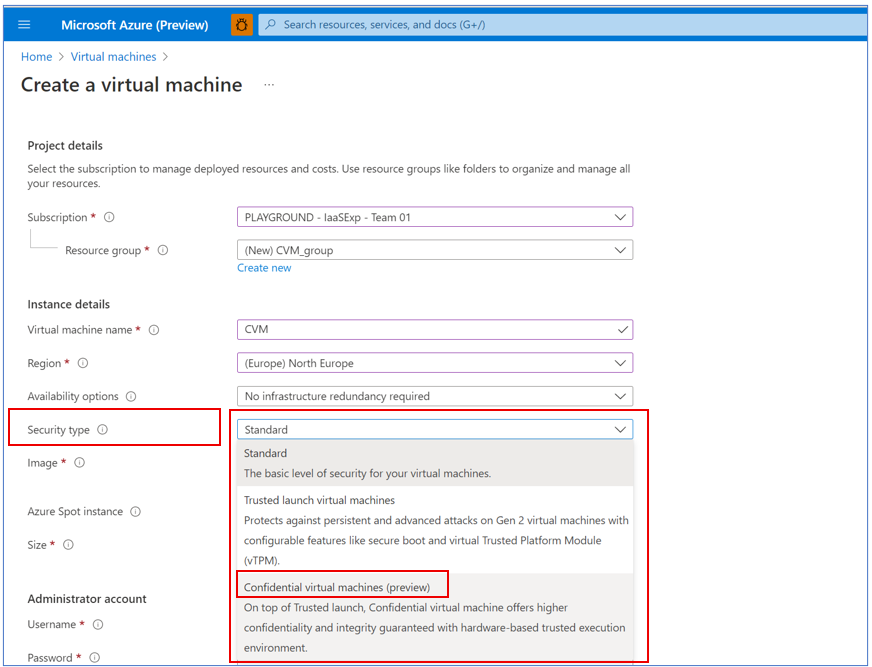
- Follow the steps as you would to deploy a new VM. If you’d like to test out ‘Confidential compute encryption’, you can select it on the ‘Disk’ tab
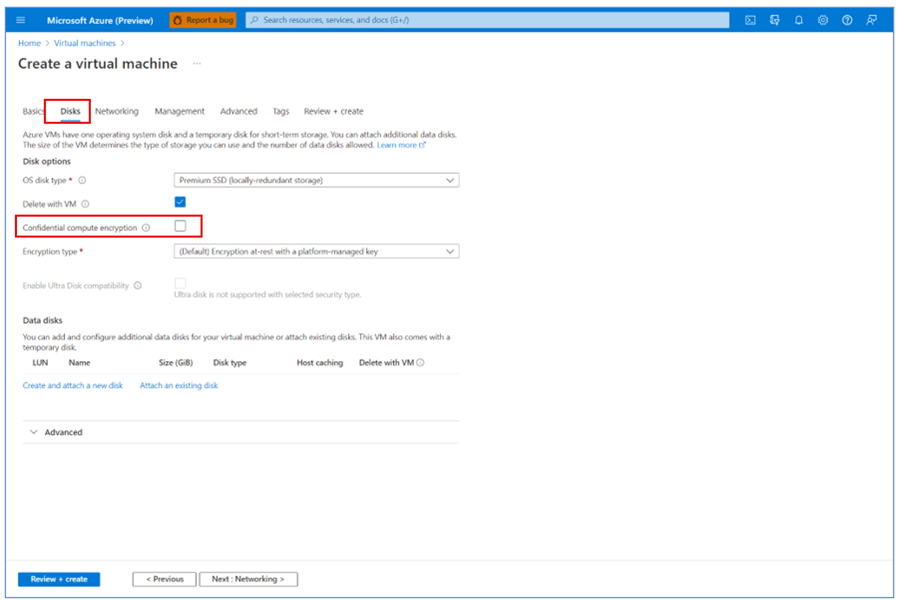
Compute>Virtual Machines
VM Applications now in public preview
Managing the deployments of custom applications can be an onerous task for administrators. Ensuring who has access to a specific application and ensuring that versions are properly updated can be complex.
VM Applications, a new resource type in Azure Compute Galleries (formerly Shared Image Gallery) simplifies management, sharing and global distribution of application packages.
With VM Applications:
- You can now define application packages, replicate, share and deploy them automatically to your VMs and Virtual Machine Scale Sets
- Add an application to a VM or VMSS at creation, or add, remove, and update applications on existing resources
This feature provides flexibility and simplicity in managing, sharing, and deploying applications. Some features include:
- Provides custom configuration of applications at deployment time
- Require applications or specific versions through DeployIfNotExist policies
- Create multiple replicas per region for reliability
- Limit which VMs and VM scale sets can install an application
Learn more about how to Create and deploy VM application packages (preview) - Azure Virtual Machines | Microsoft Docs.
Accessing VM Applications in Azure Portal
- From the Azure portal home screen, select Create a resource
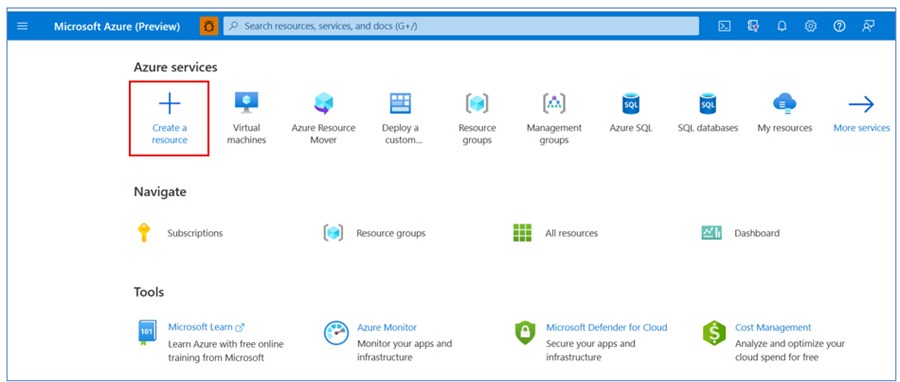
- On the Create a resource page select Virtual machine -> Create
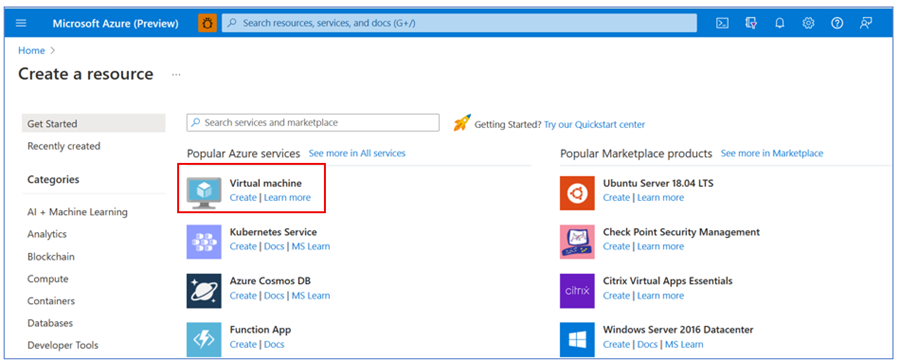
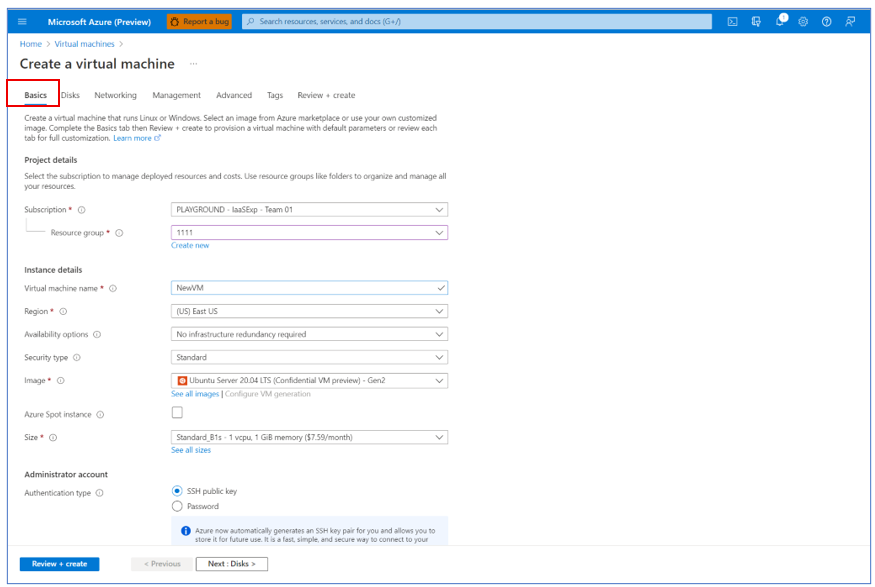
- After filling out needed information on the Create a virtual machine page ‘Basics’ tab go to 'Advanced' tab
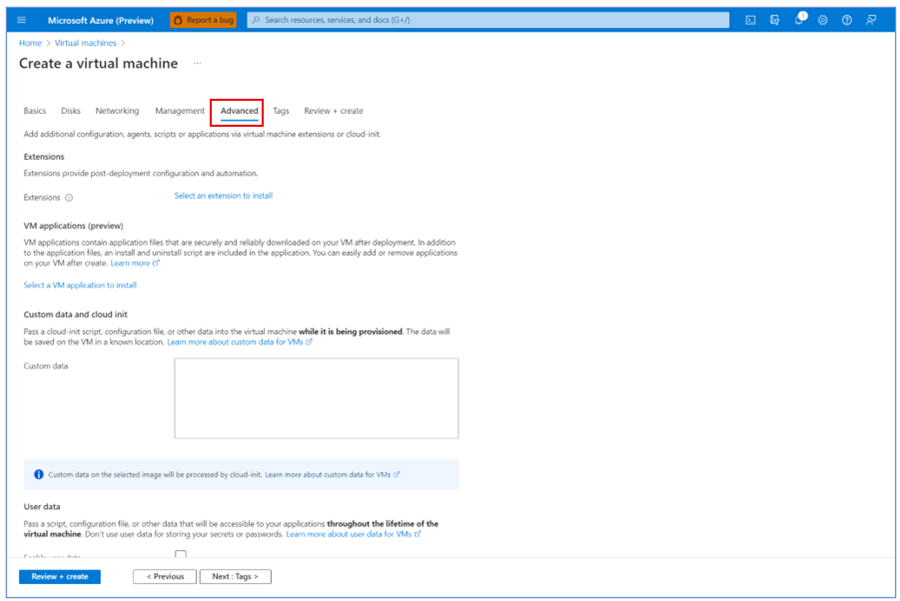
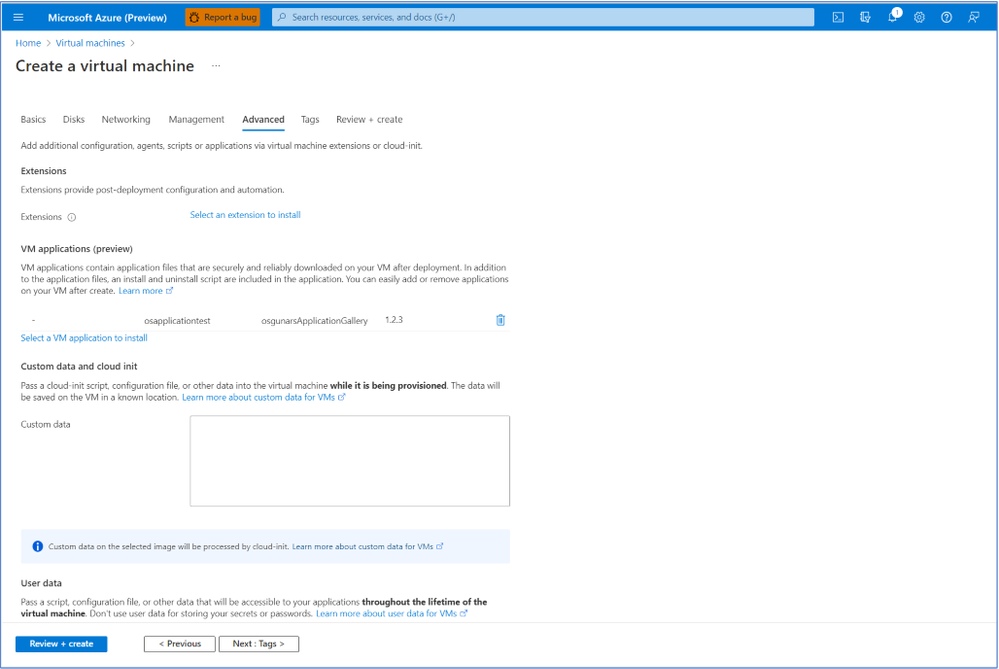
- Select a VM application to install

- Choose a VM application and continue after clicking on ‘Review + create’ with your deployment
Intune
The Microsoft Intune team has been hard at work on updates as well. You can find the full list of updates to Intune on the What's new in Microsoft Intune page, including changes that affect your experience using Intune.
Azure portal “how to” video series
Have you checked out our Azure portal “how to” video series yet? The videos highlight specific aspects of the portal so you can be more efficient and productive while deploying your cloud workloads from the portal. Check out our most recently published videos:
- How to get a visualization view of your resources
- How to manage applications in Azure Kubernetes Service
- How to get started in Azure using the Azure Quickstart Center
Next steps
The Azure portal has a large team of engineers that wants to hear from you, so please keep providing us your feedback in the comments section below or on Twitter @AzurePortal.
Sign in to the Azure portal now and see for yourself everything that’s new. Download the Azure mobile app to stay connected to your Azure resources anytime, anywhere. See you next month!
Published on:
Learn moreRelated posts
Azure Landing Zones - Policy Refresh Q1 FY25
ALZ - Policy Refresh Q1 FY25 is here! As you may be aware, the ALZ team release cadence is now on quarterly basis to help customers and partne...
Custom Policy- Reusable Logs Templates
Reusable Templates for Sending Logs to Log Analytics Workspace Challenge: When it comes to developing custom policies for sendin...
Enhancements to Azure Monitor Baseline Alerts for Azure Landing Zones
Introduction Welcome to our latest blog post where we dive into a number of exciting new key updates, highlight the new portal accelera...
Introducing the Azure Policy Community Repo
Introducing the Azure Policy Community Repo What is the Azure Policy Community Repo? The Azure Policy Community Repo is a collaborativ...
General Availability: Vaulted backups for Azure Blob Storage
We are excited to announce the general availability of vaulted backups for Azure Blob Storage. Vaulted backups can help you achieve complete p...
Azure Update Manager to support CIS hardened images among other images
What’s coming in by end of July 2024: Azure Update Manager will add support for 35 CIS hardened images. This is the first time that Update Man...
Mastering your cloud journey: Essentials to Innovating, Migrating and Modernizing, on Azure
We are living during a time of rapid growth in AI technologies and seeing cloud complexity increase as a result of those advanced workloads, w...
Public Preview Announcement: Azure Policy Built-in Versioning
Welcome to a new era of policy management, where policy definitions are more agile, adaptable, and accessible than ever before! We are thrille...
Announcing Azure Monitoring Agent support in Azure Landing Zones
Introduction Hello and welcome to another blog post about Azure Landing Zones, the best practice framework for accelerating your cloud...
Announcing the General Availability of Change Actor
Change Analysis Identifying who made a change to your Azure resources and how the change was made just became easier! With Change Analys...